BREAKING NEWS
Showing posts with label Technology. Show all posts

Tuesday, 25 July 2017

Nokia 8 to be launched on August 16

Finally, the launch date for the much awaited flagship phone by Nokia has been revealed. HMD Global who is now producing the phones with Nokia branding has started sending invites for an event in London, slotted for 16 August.
The Verge reported that the event marks the launch of Nokia 8 flagship phone with a Carl Zeiss camera. Previously, Nokia has used the lenses in phones like Nokia 808. Last week, VentureBeat reported the leaked images of Nokia 8 along with the rumored specifications.
According to the reported specifications, the phone will rock a Qualcomm Snapdragon 835 processor with 4 or 6 GB of RAM. It will have a 5.3-inch QHD display. The dual camera on the rear will be a pair of 13 MP lenses. The internal storage will be of 64 GB. And the phone will have dual SIM capacity. It will run on Android Nougat 7.1.1 out of the box.
There is no clarity on the availability of the phone in India. The company launched its budget to mid-range models Nokia 3, Nokia 5 and Nokia 6 in the country in June.

How to Flash Custom ROMs in Android Devices

Are you a proud owner of Android Smartphone? Are you wondering about the best possible way to improve the performance of your mobile? Then it’s time for you to get a Flash custom ROM that will help you to enjoy a better experience. Below have been discussed some of the vital steps by which you will be able to Flash Custom ROM on your Android device in a convenient way.

1. Things required to Flash Custom ROM

Firstly you need to arrange some of the essential things before installing the specific ROM on your android device. Make sure to have a Rooting package, a computer, USB cable and an Internet connection.

2. Unlock the Bootloader

Most of the android devices come with a locked bootloader. In order to flash custom ROM, you need to unlock the specific bootloader. The best way is to search the web and get the unlocked bootloader in a convenient way.

3. Get the device rooted

Rooting the android device is not at all a stressful job. You need to download the rootkit of your device from the web and then download it in a safe way. Rooting will enable you to access and control the various subsystems of the Android operating system. 

4. Install custom recovery

Every android device comes with a pre-installed custom recovery that allows the user to regain the factory settings as and when required. It also helps to update the current operating system and improve the device performance. Installing a third party custom recovery will replace the pre-installed recovery environment with a new one.

5. Take the backups

Make sure to backup your device before starting the custom ROM installation process. You must backup all the unique applications that have been installed on your mobile device. Even though this step is not vital but it will help you to get rid uncertainties while flashing the ROM in the device.

6. Download the ROM for your device

Now you have to download the specific ROM for your device from the web. Make sure to go through reputed websites that allow users to download custom ROM according to the specification of the android device. Then you will have to transfer the ROM to the internal storage of your Android device.

7. Reboot the device

Lastly, you need to reboot the device with the help of the third party custom recovery and thereby improve its performance.

Make sure to follow all the steps in a proper manner. Check your phone compatibility with ROM and Recovery. If you still find this job to be stressful, make sure to contact a professional person who has lots of experience in this field.

If you want to know which is best ROM for your device, mention it on comments below.

Source:www.geekyvicky.com

How to Become an Ethical Hacker?

To improve the security on the internet, there’s been an increasing demand for ethical hackers (also known as white hat hackers) as they protect the computer systems from dangerous intrusions. There’s been need of technically skilled IT pros with a strong desire to solve problems and prevent malicious hackers from causing damage to network systems.

We should know that the internet security is not about creating awareness, it’s all about contributing yourself to improve it and ethical hacking is the way you can contribute. Many people ask me every day “How to become an ethical hacker?”. And I always tell them that to be a professional ethical hacker you require motivation, dedication, initiative, self-education and formal training in ethical hacking. But, it doesn’t seem like they get satisfaction after my answer.

So, here I am going to share “How to become an ethical hacker” and I’ll be adding some articles at the End of this article where you can learn the basics of white hat hacking and I will be linking some of my articles which will help you to understand it better. So, first of all, clear your concepts regarding the difference between a hacker and a cracker.

A hacker is a computer programmer who loves to tweak with the computer systems to get more than available information and would like to have an unrestricted access to anything he desires. And a Cracker is a malicious hacker i.e. a cracker is a hacker who had hideous intentions and likes creating/destroying others. He simply gets happiness by hurting someone else. In short remember a cracker is the bad guy-the sadist!

How to become an Ethical Hacker?

Hacking is not something you can learn by simply reading eBooks, reading this article, watching YouTube videos, liking hacking related facebook pages or by following some websites. But these are very important to practice for hacking and to raise your interest and gain more knowledge. Yes, It needs a lot more efforts. You have to be constantly updated with the latest technology and you should do a lot of live hacking then only will you reach near perfection.

Now, If you are serious about learning this stuff, you must have patience and knowledge of following:

1. Programming

A programmer or developer knows how to develop a software and a website. This software or websites may be very important and require better security. Here, a role of hacker will be as a security analyst who should find the flaws in the programs or websites and help a programmer to make it more secure. It is not possible if the hacker doesn’t have the knowledge of programming and development. So, You have to keep patience and learn programming. I have already written some articles that will help you to understand programming and development.

1.How to become a Good Programmer?2.Best Websites to Learn Programming.

You must read these articles to learn about programming.

2. Networking

The knowledge of networking is very essential. We daily share a lot of stuff on the internet. Some data may be shared publicly but some data must be secured like your passwords, pictures, bank information etc. An ethical hacker must have the ability to find out any flaw in the network security. If he/she is well aware of the working of an internet, he/she can figure out most of the problems on the network. I am mentioning some articles that will help you to learn about internet concepts and the reality of passwords you daily use.
1.Internet concepts: How does internet work ?
2.Password Secrets: Everyone should be aware about .

3. Cryptography

Do you know whenever you Log-In to your bank website (or any website that requires high security), It encrypts your information so nobody can understand what your information is? It is possible with cryptography. There are basically two terms used in the cryptography:

EncryptionDecryption

Encryption is changing real data into another form so nobody can understand and decryption is getting back the information that were changed into the another form. The data can be de-crypted by the same system that is used for encryption using the same technology.

So, a hacker must have knowledge of cryptography and its algorithms and key concepts. It is definitely not hard to learn if you learn with proper interest .

4. Database Management system

If you know the programming and development then you must know how the website or program is developed. We will have knowledge of networking so we will find out whether the host is properly connected and secured or not. With the help of cryptography, we will insure that how much the data is secured.

But is there something missing? Yes, we did not talk about the databases. All the data we share on the internet through any website is saved somewhere in databases. And these databases contain very important and sensitive information which must be only visible to authorize person like our bank account (Though, a Facebook account is more important). Even if the data is encrypted, A hacker may brute-force the algorithms and decrypts the data. So , A database must be properly secured from attacks.

To be an ethical hacker, you must have to know how data is stored , how data is retrieved and how it can be secured.

5. Linux

Linux is powerful. It’s also free, and 100% open source, meaning anyone can look at each and every line of code in the Linux kernel and patch it when problems arise, means that Linux can be secured not just by a few programmers locked away in some corporate headquarters, but by any user at any time. This is one thing , but there are 99 more.

I have written two articles and they are enough to tell you why do I prefer Linux

1.Why does hacker Prefer Linux?
10 reasons : why should we use Linux.

That’s all . I might not satisfied you hunger to learn hacking but trust me there is nothing you can do if you just ignored the whole article. I am sharing some more interesting article below that will rise your interest in hacking

1.What is a DDoS Attack?
2.How does social media sites can be hacked ?
3.How to Get best Possible security on the internet?
4.Worlds Top 10 most wanted black hat hackers

Sorce:www.geekyvicky.com

What is a VPN and How does a VPN Work?

What is a VPN?

VPN stands for Virtual Private Network, and maybe you have heard or read that term in association to privacy and geolocation. In this article we will learn and look into what exactly is it how does it work and what can it do for you.

How does a VPN Work?

Let me explain it now but before we dive into VPNs, let me tell you a little bit how the internet works now. At home, you have probably got some router or modem from your telephone company or your internet service provider. Then that is connected to your desktop, maybe by an Ethernet cable, to your smartphone over Wi-Fi, perhaps to your laptop over Wi-Fi and so on. Inside of your house when you do a laptop talk or your PC talk or your phone talk that is part of your private network, and that does not go out onto the internet. It stays inside your house, but the moment you open a web page somewhere out on the internet that data flows through your modem down into your local phone company or ISP and then out across the internet.

It will travel across the internet until it gets to the server the server will then reply with some information that will come back through the internet into your local telecommunications provider or ISP down through to your modem and then back onto your PC or your Android smartphone. Now, while all that data is rushing around the internet, it needs to know where it is going and the things to know where they are going. They need an address it is the same with the postal service is the same when you want to go and visit somebody. It is the same with data on the internet.

There are different layers of addressing or different types of addressing that go on, but at the highest level, each of these packets of information has what is called an IP address. The IP address is you have probably seen them there those four digits from 0 to 255 with dots in between them so maybe like 178.304.67. The modem or your router has probably been assigned an IP address from your ISP and what happens in is that when your data goes through the internet every piece of equipment, it touches every router every server it touches knows that your IP address. It is done that is not because they are trying to spy on you but because trying to connect collect data about the number of people that clicked into their website.

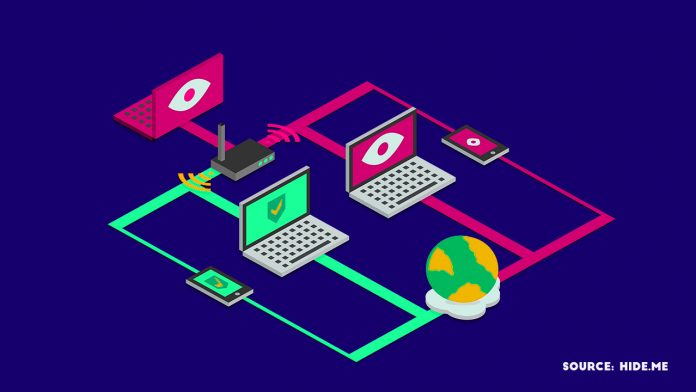
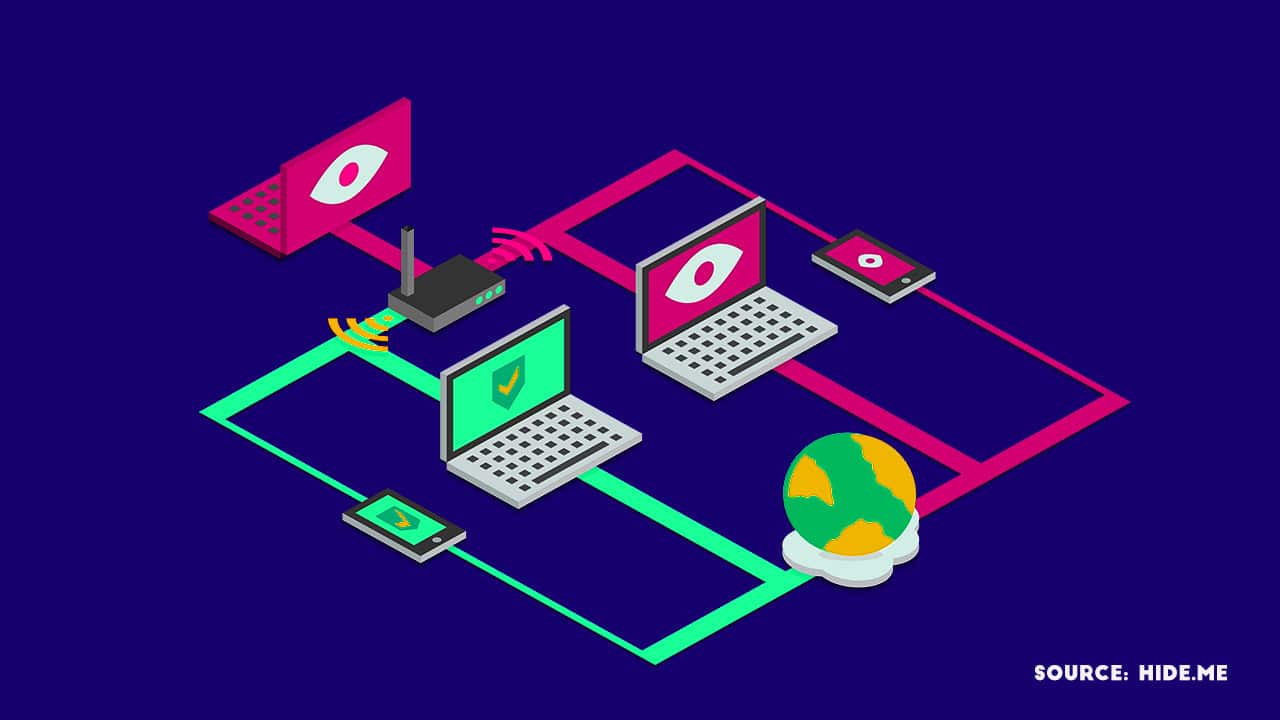
What a VPN does is it allows you to create a tunnel a connection from your home computer to a server somewhere else in the world. The connection is encrypted, and then when I access something on the Internet, it goes through that tunnel and then it arrived at that other server and then it goes on to the Internet, and it will finally arrive at the web server or the service. Your IP address will no longer be your IP address. The IP address of the VPN server protects your IP.

If you use a VPN, first of all, your local telecommunications provider and your local government have no idea about the sites that you are accessing. When you go through the VPN, it is all encrypted. VPN allows you to connect to another server in another country.

Source:www.technotification.com

What is the Deep web or Dark web? How to Access it?

How to Access Deep Web and Dark Web?

Without the Internet in the present generation, our lives would have been incomplete. The Internet benefits us a lot in many ways. Today in this article let us not discuss the pros or advantages of the Internet. Few of you might hear about Dark Web; we will make you understand what Dark Web is in this article.

There are so many things that are hidden from regular internet use, by many secret agencies, large enterprises, and governments. Few of them are illegal things. Before we tell you How to access the dark web? Look into different features.

The internet sites which we access in our daily life like Google, Facebook, YouTube and many other popular sites these are the part of the surface internet (which are easily visible to any person). We can search the surface internet and access quickly with the help of any traditional search engine tools like Google, Yahoo, Yandex or any other popular browser like Chrome or Firefox.

They are few sites on the internet which are protected with passwords. No one can enter the site without permission. These sites are not indexed by search engines because the bots cannot enter these sites because of the password protection.

Deep Web

Let us explain about Deep Web first before going to Dark Web. First, don’t get confused between Deep Web and Dark Web. These two are different parts of the internet we use. Deep Web is the encrypted or password protected network protected by Tor Servers.

In the deep web of the internet, you will see the databases and secret files of government agencies, big business, and many other which are not helpful for a regular internet user to know, and that is the main reason that these things are hidden from a regular internet user.

These files and sites are protected because no-one can misuse the information. Tor Network protects this confidential information.

Want to access the deep web? Here it is how to do it:

First, If you want to access the deep web, you need a special URL. Special URL can be received from the agency or company for accessing the Deep Web. Without the URL and Password, no one can gain entree to the Deep Web.

This type of protection is helpful for the businesses who want to share their data across the globe but with limited persons deep web method help them a lot.

Dark Web

Dark Web is the deepest and unsafe part of the internet that anyone can reach. Dark Web is the place of the web where many illegal things like Drug Trading, Weapons, Human part trading, Arms Trading, Child Pornography, Hitman hiring, Credit card trading, Fraudulent passport and CitizenShips, Money Laundering and Counterfeiting happen.

Dark Web is the place for criminals, Black Hat Hackers, and Terrorists. If you access the Dark Web with your normal browsers like Chrome and Firefox, the hackers can trace you easily and steal your credit card or private information, and you will be in trouble.

Accessing dark web is not easy because of the overlay networks. We require specific software and configurations or authorization to access the dark web.

The darknet which establishes the dark web includes small, friend-to-friend peer-to-peer networks, and as well as large, popular networks like Freenet, Tor, and I2P, operated by public organizations and individuals. Users of the dark web refer to the regular web as Clearnetdue to its unencrypted nature. The Tor dark web may be referred to as Onionland, a reference to the network’s top level domain suffix .onion and the traffic anonymization technique of onion routing.”

How to access Dark Web?

If you want to access the dark web, the first and foremost task to do is to download and install the Tor browser from the PC you want to access it. Go to the Security Settings page and then set the security level to high(no one can trace you while surfing Dark Web). Changing the settings makes your browser and PC little slow because it changes the IP in seconds so that you will be safe.

Note that the websites in Dark Web have a different URL from normal URL we use daily. Dark Web URLs most end with a .onion extension like, e.g., http://3g2upl4pq6kufc4m.onion/. http://3g2upl4pq6kufc4m.onion/ is the link to a popular search engine in Dark Web named as DuckDuckGo. DuckDuckGo search engine has a unique feature; the search engine never traces the users any data or the search history.

There are many secure search engines available apart of DuckDuckGo.DuckDuckGo is default search engine of TOR Browser.

After setting up everything the actual Dark Web is on Hidden Wiki, So read below to get the complete guide How to access the dark web?

The Hidden Wiki

The Hidden Wiki is the name of several censorship-resistant wikis operated by Tor hidden services. These are like regular Wikipedia pages anyone can anonymously edit it after registering on the site. The homepage works as a directory of links to other .onion sites like references. Just search Hidden Wiki on DuckDuckGo Search Engine from your TOR browser to access it. The first Four or Five links(depends) will not be the hidden wiki; Hidden wiki link look like this below image.

How to Access Deep Web and Dark Web?

The first Hidden Wiki was operated through the .onion top-level domain which can be accessed only by using Tor or a Tor gateway.
The homepage provided by the community as a link directory to other hidden services like to offer contract killing, money laundering cyber-attacks for hire, contraband chemicals, bomb making and many other illegal things. The rest of the wiki was virtually uncensored as well and offer links to websites hosting child pornography and abuse images.

Did you know? The first iteration of the Hidden Wiki founded in October 2011, came to fame with its associations with illegal content. Before August 2013, the site was hosted on Freedom Hosting.

There are other hidden sites you can check with the help of the hidden wiki. The dark web is as big as surface web the more you check, the deeper you go. Please don’t click any of the suspicious links, because no one knows what is behind the link you clicked.

Warning: The article is written to provide knowledge about deep web and dark web. We don’t encourage or recommend it by any means. We are not responsible for any problem you get into or caused by you. 

Source:ananth talam (www.rsbport.com)

RIP MS PAINT: Microsoft Is Killing MS Paint After 32 Years


32 years of MS Paint Era Ends


Microsoft’s next new Windows 10 update named the Autumn Creators Update has a variety of new features. Microsoft will be removing Microsoft Paint in the new update. MS Paint was first released in the very first version of Windows 1.0 in 1985. MS Paint in its various appearances was one of the first graphics editors used by many, and it became a crucial software of Windows.

If you remember beginning as a 1-bit monochrome licensed version of ZSoft’s PC Paintbrush, it wasn’t until Windows 98 that Paint could save in JPEG. But now with the Windows 10 Creators Update, released in April, Microsoft introduced an interesting software named Paint 3D replacing MS Paint.

The Paint 3D image making tools have some basic 2D image editing options. Paint 3D is not an update to the MS Paint. Microsoft has completely removed the Paint and replaced with Paint 3D. Besides MS Paint Microsoft has removed Outlook Express, Reading list, and Reader app. These software has been signaled for an end having been added to the “features that are removed or deprecated in Windows 10 Fall Creators Update” list.

The paint was one of the best memory it ever gave to all the 90’s kids. But it had cons back then; Paint was limited to the bitmap and PCX formats until 1998. Don’t forget if we wanted to scribble something out quick and paste job; MS Paint was always there.

The recent version of MS Paint for Windows 7 and later versions were improved but still was poor when compared to other free alternative software such as Paint.NET. The Microsoft Paint date when it will be officially removed from Windows has yet to be confirmed(changes from country to country).

The precise date for the release of the Windows 10 Autumn Creators Update is up in the air. Windows users of 90’s will celebrate or decry Paint’s removal, it will be a moment in the history of Windows as one of its longest-standing apps is put out to pasture.

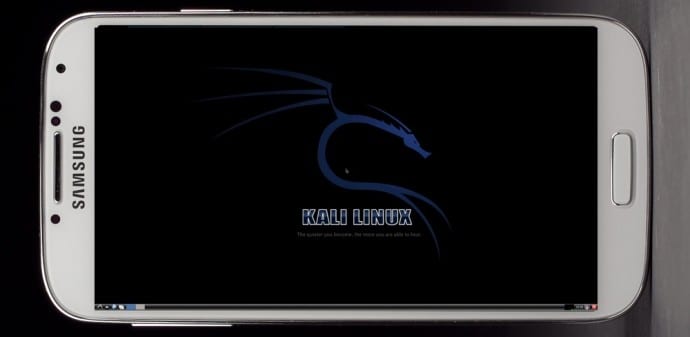
How To Install Kali Linux On Android Smartphone

Install Kali Linux on your Android device and develop a portable penetration testing environment

Kali Linux, a secure distribution of Linux, is one of the most widely used OS among ethical hackers  (and unethical hackers). The reason is that Kali Linux has almost every tool required for pentesting pre-installed. And a great back end support fromOffensive Security make it a great platform for beginners as well as professionals. Kali Linux is a successor of BackTrack OS which was also developed by Offensive Security.

The developers at Offensive Security have been working extensively for developing a dedicated operating system for cyber-security researchers. Along with ARM devices, Kali Linux is available for Android too.

The installation process is very simple and straightforward. If you have a rooted Android phone having at least 5GB of free storage and a fast internet connection (to download repository files), then everything else is just a matter of few taps on your smartphone.

First of all installLinux Deploy app from Play Store.

Now make sure that your phone is in the required state for installation. That is, make sure that your phone is rooted, having 5GB of free space, an internet connection with decent speed (and you are patient enough to wait for Kali to bootstrap from the network).

Root privilege is required because Kali will install itself in chroot mode. Which means that allowed access will be restricted to specified directory (acting as root directory) and their children.

Step 2 is running the app, and selecting Kali Linux in the distribution tab. Optionally, you can choose your architecture, verify that the Kali mirror is correct, set your installation type and location on your Android device, etc. Generally speaking, the defaults provided by Linux Deploy are good to begin with.

Once all the settings are at place, hit the “install” button and app will start a Kali Linux bootstrap directly from repositories of Offensive Security. Depending on your Internet connection speed, this process could take a while. You’ll be downloading a base install of Kali Linux (with no tools) at minimum.

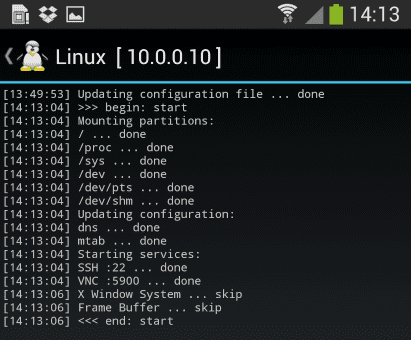
When the installation is complete, you can have Linux Deploy automatically mount and load up your Kali Linux chroot image. This also includes the starting of services such as SSH and VNC for easier remote access. All of this is automatically done by hitting the “start” button. You should see Linux Deploy setting up your image with output similar to the following:
Kali Linux

At this stage, Linux Deploy has started a VNC and SSH server inside your chrooted Kali image. You can connect to the Kali session remotely using the IP address assigned to your Android device (in my case, 10.0.0.10).

Logging In:

You can now access your Kali Linux instance with either VNC or Secure Shell(SSH). The required credentials are-
For VNC password is “changeme”
For SSH username is “android” and password is again “changeme”

This is what it all looks like on your device:

Linux localhost 3.4.5-447845 #1 SMP PREEMPT Fri Apr 12 17:22:34 KST 2013 armv7l
Kali GNU/Linux 1.0 [running on Android via Linux Deploy] android@localhost:~$ sudo su
root@localhost:/home/android# df
Filesystem 1K-blocks Used Available Use% Mounted on
/dev/loop3 4180944 667268 3304012 17% /
tmpfs 952708 80 952628 1% /dev
tmpfs 952708 0 952708 0% /dev/shm
root@localhost:/home/android#
root@localhost:/home/android# apt-get update
Hit http://http.kali.org kali Release.gpg
Hit http://http.kali.org kali Release
Hit http://http.kali.org kali/main Sources
Hit http://http.kali.org kali/contrib Sources
Hit http://http.kali.org kali/non-free Sources
Hit http://http.kali.org kali/main armel Packages
Hit http://http.kali.org kali/contrib armel Packages
Hit http://http.kali.org kali/non-free armel Packages
Ign http://http.kali.org kali/contrib Translation-en_US
Ign http://http.kali.org kali/contrib Translation-en
Ign http://http.kali.org kali/main Translation-en_US
Ign http://http.kali.org kali/main Translation-en
Ign http://http.kali.org kali/non-free Translation-en_US
Ign http://http.kali.org kali/non-free Translation-en
Reading package lists… Done
root@localhost:/home/android#

Memory Considerations:
If left unchanged, Linux Deploy will automatically set an image size of around 4 GB, for a “naked” installation of Kali. If you would like to install additional Kali tools down the road, you might want to consider using a larger image size, which is configurable via the settings in Linux Deploy.

Quick Tip: Prefer SSH over VNC while logging into your OS. This will save you a lot of time.

Post your further queries in the comment box to get them resolved.

Source:www.techworm.net

Monday, 24 July 2017

How much Ram does a smartphone actually need?


Buying a smartphone today can be confusing. Long specification sheets are crammed with numbers, and their relationship with real-world performance is not always clear. One of the most misunderstood of all those specs is RAM, or Random Access Memory.

If you’re wondering how much RAM your smartphone needs, then you’re not alone. This question has popped up again and again since the dawn of the smartphone. We decided to ask some experts about how much RAM the average person really needs, what it does, and how it works.

WHAT DOES RAM DO?

“Smartphones have come a long way in the last few years and do more for us now than ever,” Vishal Kara, Head of Product at Piriform(the makers of CCleaner for Android) told Digital Trends. “As we perform more and more tasks using our smartphones, more RAM is necessary for them to continue functioning efficiently.”

We install apps and games into internal storage, our CPU (Central Processing Unit) and GPU (Graphics Processing Unit) deal with processing, so what does RAM do?

“Smartphones require instant access memory for multitasking – which is what RAM delivers,” Kara said. “Essentially, RAM keeps all your operations running at once.”

“There is no right or wrong to how much RAM a smartphone requires"

When you run an app or game on your phone, it’s loaded into RAM. As long as an app is still in RAM, you can jump back into it where you left off without loading it afresh. This is why RAM is important for multitasking. The loaded apps stay there until your RAM fills up and needs to flush something to make room for something else.

In theory, more RAM means that you can have more processes and therefore more apps running at once.

“There is no right or wrong to how much RAM a smartphone requires, although RAM plays a big part in how fluid and seamless our smartphone experience is,” explains Kara. “Unlike PCs, where a few seconds delay in an app loading is acceptable, we expect apps to load instantly on our smartphones even when we’re on the go.”

RAM also enables processes to run in the background. Some of these background processes, such as your phone checking for email, are really useful. Others, like a piece of carrier bloatware or an app that you never use, are not.

THE RISE OF RAM

The first Android smartphone, the T-Mobile G1 or HTC Dream, had just 192MB of RAM and the original iPhone got by with 128MB of RAM. Those numbers have climbed steadily over the last decade or so, with an occasional leap prompting a new round of discussion. OnePlus most recently reignited the debate with the OnePlus 5, which boasts 8GB of RAM.

“With 8GB of RAM, the OnePlus 5 can run more apps in the background allowing for faster multitasking, and, with the unrelenting development of innovative applications and technologies, the demand for more power and memory in smartphones is ever-increasing,” Laura Watts, European communications manager for OnePlus, told Digital Trends in an email. “With 8GB of RAM, the OnePlus 5 allows all users to easily run the most powerful applications and eliminates all doubt in its ability to do so in the future.”

OnePlus 5: 8GB of RAM

Julian Chokkattu/Digital Trends

Since most of the rest of the flagship smartphone pack is around the 4GB RAM mark right now, the jump to 8GB seems dramatic.

“Generally speaking, more RAM is better, and performance isn’t hampered by having more RAM,” John Poole of Primate Labs (makers of benchmarking software Geekbench 4 for iOSand Android) explained to Digital Trends. “But is it really necessary?”

The amount of RAM we need is certainly growing. The average smartphone user launches 9 apps per day and uses around 30 different apps in a month, according to App Annie. Digging into the memory tab in the settings of my HTC U11, which has 4GB of RAM, reveals that average memory use over the last day was 2.3GB and that 47 apps used memory during that period.

We also have more storage than ever. The OnePlus 5 with 8GB of RAM has 128GB of storage. That’s enough space for a lot of apps.

Poole also points to the fact that software is growing bigger and more complicated, cameras are shooting larger images in RAW format and performing more image processing, and screens are getting bigger, but he’s still skeptical about the need for 8GB.

“For smartphones, 4GB is plenty right now,” Poole said. “My feeling is that some vendors will engage in a specifications war where they’ll overprovision the amount of RAM simply because it’s a selling point -- they can say ‘look at how much more RAM our phone has than our competitors’ phone, clearly our phone is better’.”

It’s a sentiment that was shared by Huawei executive, Lao Shi, earlier this year.

WHY HAVING MORE RAM ISN'T ALWAYS BETTER

If RAM offers potential performance improvements and greater convenience, then you may be wondering: what’s wrong with having more of it?

If you aren’t using the RAM, then it may be a drain on your battery.

“The more RAM you put into a phone, the more power that will draw and the shorter your battery life will be,” Poole said. “RAM takes up the same amount of power regardless of what’s in it -- if it’s an application or it’s just free, you’re still paying for it in terms of power.”

In other words, if you aren’t using the RAM, then it may be an unnecessary drain on your battery. Those background processes that we mentioned earlier also have an associated cost, as anyone who has used the Facebook app on Android will know.

“Even if they’re not doing much, they can cause the processor to spin up to service any work that they have to do and that can contribute to energy drain,” Poole said.

THE IPHONE IN THE ROOM

Android phones have jumped from 2GB to 4GB RAM as standard, and we’re now seeing phones with 6GB and 8GB of RAM -- Apple’s iPhone has always gotten by with less.

Apple executives have traditionally remained tight-lipped about how much RAM is in the iPhone -- it’s not a spec they talk about. But we know from teardowns that the iPhone 7 has 2GB of RAM, and even the current top-of-the-range iPhone 7 Plus manages with 3GB of RAM.

iPhone 7: 2GB of RAM

Apple achieves comparable performance with less RAM because of fundamental differences in how the iOS and Android platforms handle memory management. Android relies upon something called garbage collection, while iOS takes a reference counting approach. A brief web search will reveal that the debate on which is better rages on, but it seems to be generally accepted that garbage collection requires more memory to avoid performance problems.

They may be different, but both platforms have a system of memory management that dictates what the RAM does. Because of this, you may not actually see any performance boost by simply adding more RAM – you would have to also tweak the memory management rules to take advantage of it. To what degree manufacturers are actually doing this is unclear.

Apple and Huawei did not respond to requests for comment. LG and HTC did not wish to participate in this article.

FREE THE RAM

“Users have been conditioned to believe that free RAM is an indicator of good performance from the days of PCs with limited memory, where this was a reasonable belief,” Kara said. “Nowadays, with more memory available, the perception that free RAM is an indicator of performance is a misconception. In fact, for a smartphone it’s the opposite.”

This misconception that having free RAM is a positive thing persists. Also, if you’re in the habit of clearing away your open apps, you should probably stop doing it because it isn’t helping. It won’t save battery life or make your phone run any faster, in fact, it can have the opposite effect.

“The operation of loading an app from storage into memory requires a lot of processing power, which results in higher power consumption,” Kara said.

Most manufacturers still provide utilities that allow you to review RAM and sometimes to free it up and close processes. Third-party task killer apps were also big for a while, but Poole describes them as “snake oil.”

“People want to see their RAM free, viewing it as headroom to work in,” says Poole. “But it’s better if your RAM is being used.”

Ultimately, how much RAM your smartphone needs depends on how you use your smartphone, but it’s no longer the problem it once was. Maybe a few power users will be able to feel the benefit of 6GB, and you might argue that 8GB is future-proofing. But anything over 4GB is probably overkill for the vast majority of people today.

VIEW ORIGINAL ARTICLE

India overtakes the USA to become Facebook’s #1 country


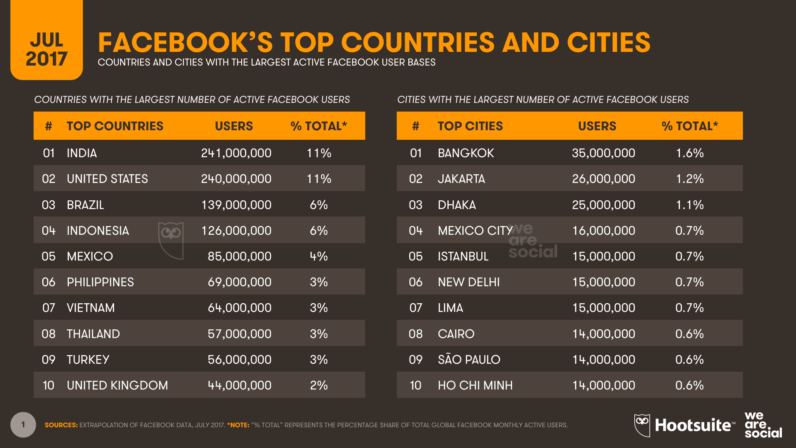
The latest figures that Facebook is reporting to advertisers indicate that India has overtaken the United States to become the platform’s largest country audience.

As of July 13th, Facebook is reporting a total “potential audience” of 241 million active users in India, compared to 240 million in the United States.

The change at the top of the platform’s country rankings comes just a few days after Facebook announced it has more than two billion monthly users around the world.

Facebook has achieved impressive growth in both countries since the start of 2017, but these new figures suggest that active users in India are growing more than twice as fast as they are in the United States.
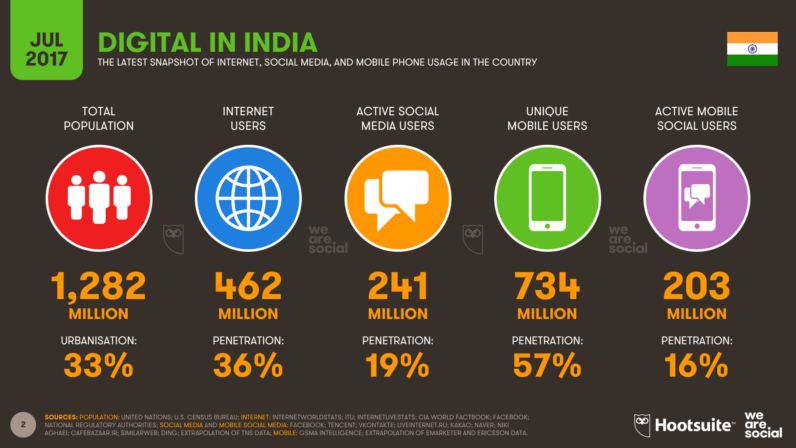
Active users in India are up 27 percent in the past six months alone (+50 million), compared to growth of 12 percent (+26 million) in the United States over the same period.

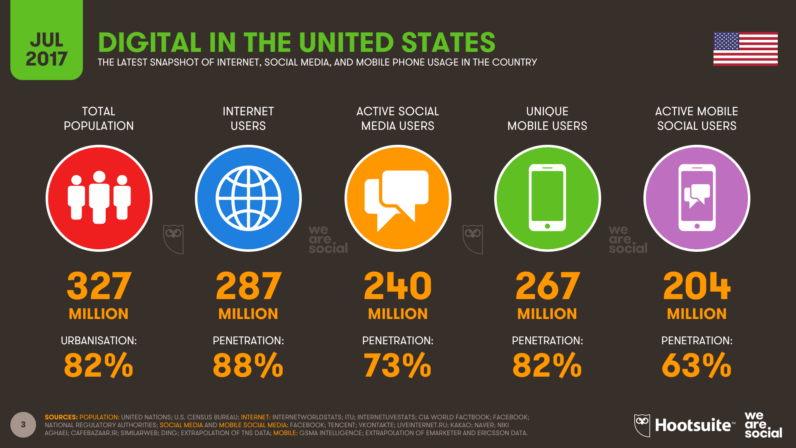
Despite these strong gains, social media penetration in India remains relatively low, with just 19 percent of the country’s total population using Facebook in the past month. That compares to 73 percent penetration in the United States, and a global average of around 42 percent.
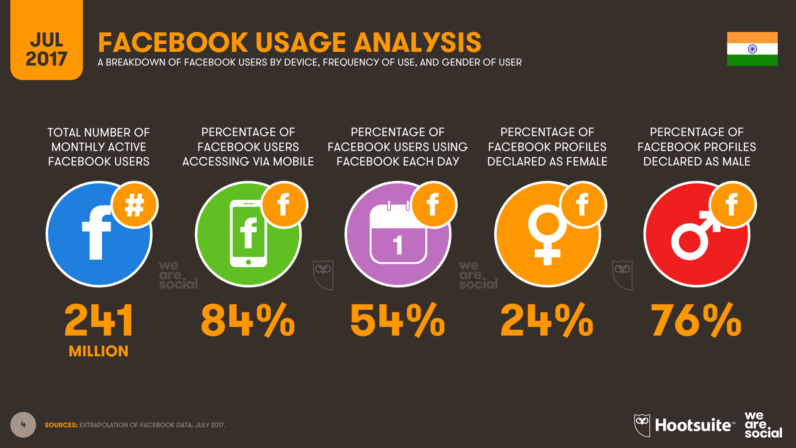
It’s worth noting that the numbers Facebook reports to advertisers can change on a daily basis though, and the platform even reported a slight dip in global user numbers just before it announced its two billion active user milestone.

I’ve also noticed a few discrepancies in the numbers that Facebook reports for the same audiences across different parts of its advertising tool too, and some of these numbers don’t always make sense when compared to real-world populations either.

Despite these caveats, I’ve been tracking active user numbers for the United States and India for a few months now, and this change at the top of the country rankings is consistent with growth trends for the past six months.

Audience imbalance

Sadly, these rapid gains have done little to address the gender imbalance in India’s Facebook audience, and the ratio hasn’t improved since our Global Digital report in January

Men still represent three-quarters of the country’s active Facebook profiles, although it’s worth noting that this represents reported gender – a topic we explored in more detail in this piece on Facebook’s demographics a few weeks ago.

Facebook’s gender imbalance in India is in stark contrast to its US audience, where 54 percent of the platform’s active users are women.
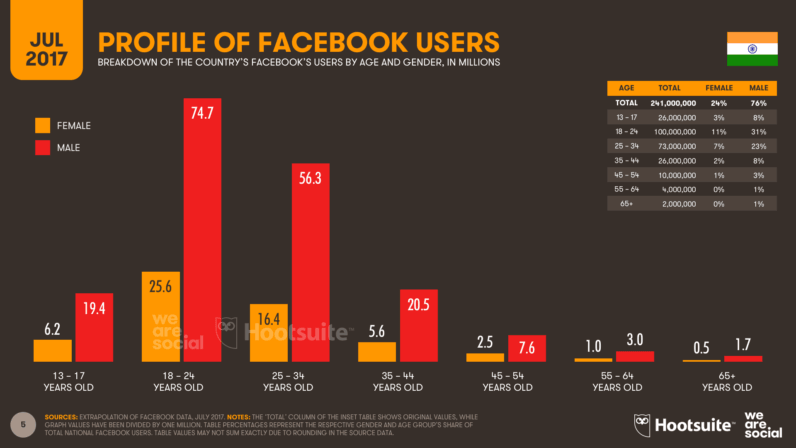
Facebook’s active users in India also skew young, with more than half of the country’s users below the age of 25.

As the penetration of internet-connected smartphones continues to grow in India, it’s likely that we’ll see these discrepancies start to even out, but there’s still lots of work to do to ensure that everyone in the country can benefit from the advantages of the connected age.
Google app is getting smarter, more personalized feed , machine learning.

As the late, great Dr Seuss once said, “there is no one alive who is you-er than you.” At Google, we know this statement is truer than true. Sure, we all have many things in common, but none of us has quite the same mix of passions, interests and goals as the next person. And, while we each keep up to date on the things that matter to us in different ways—social media, news apps, talking to friends—it’s hard to find one place to stay in the know about exactly what matters to you. Today that’s changing.

People have long turned to Google to get answers, learn about the world, and dig deeper on topics they’re passionate about. Today, we are announcing a new feed experience in the Google app, making it easier than ever to discover, explore and stay connected to what matters to you—even when you don’t have a query in mind.

A smart feed that changes with you

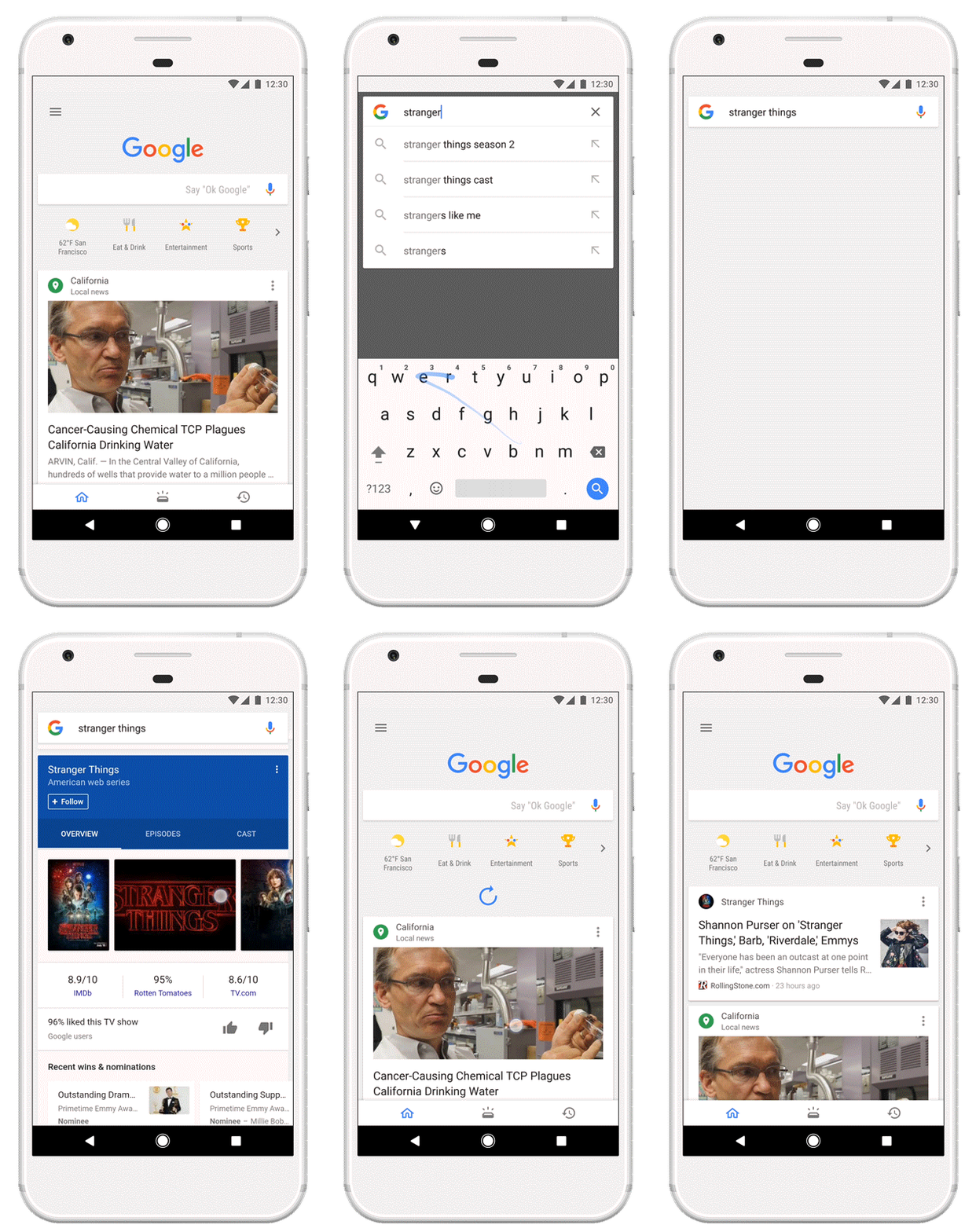
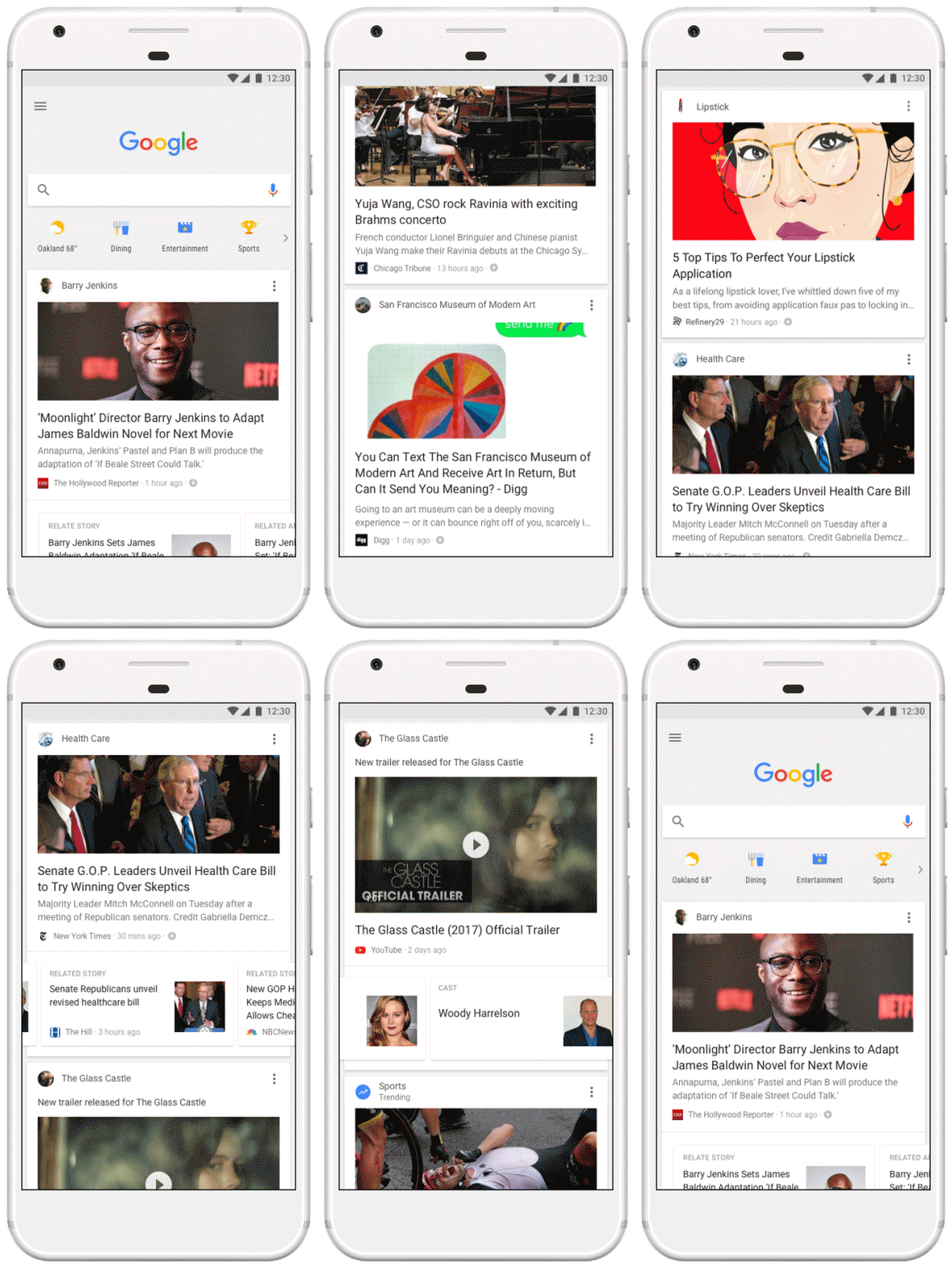
Since introducing the feed in December, we’ve advanced our machine learning algorithms to better anticipate what’s interesting and important to you. You’ll see cards with things like sports highlights, top news, engaging videos, new music, stories to read and more. And now, your feed will not only be based on your interactions with Google, but also factor in what’s trending in your area and around the world. The more you use Google, the better your feed will be.

As the world and your interests change, your feed will continue to grow and evolve along with you. You’ll notice that your feed will also reflect your interest level for various topics—for example, if you’re a photography enthusiast but just casually interested in fitness, your feed will show that. But if you see something that isn’t up your alley, unfollowing topics is easy too. Just tap on a given card in your feed or visit your Google app settings.

Follow your favorites

While we’ve been getting better at understanding your interests, it hasn’t always been easy for you to choose new topics for your feed. To help you keep up with exactly what you care about, you’ll now be able to follow topics, right from Search results. Look out for a new “Follow” button next to certain types of search results—including movies, sports teams, your favorite bands or music artists, famous people, and more. A quick tap of the the follow button and you’ll start getting updates and stories about that topic in your feed.

Broader context and deeper exploration

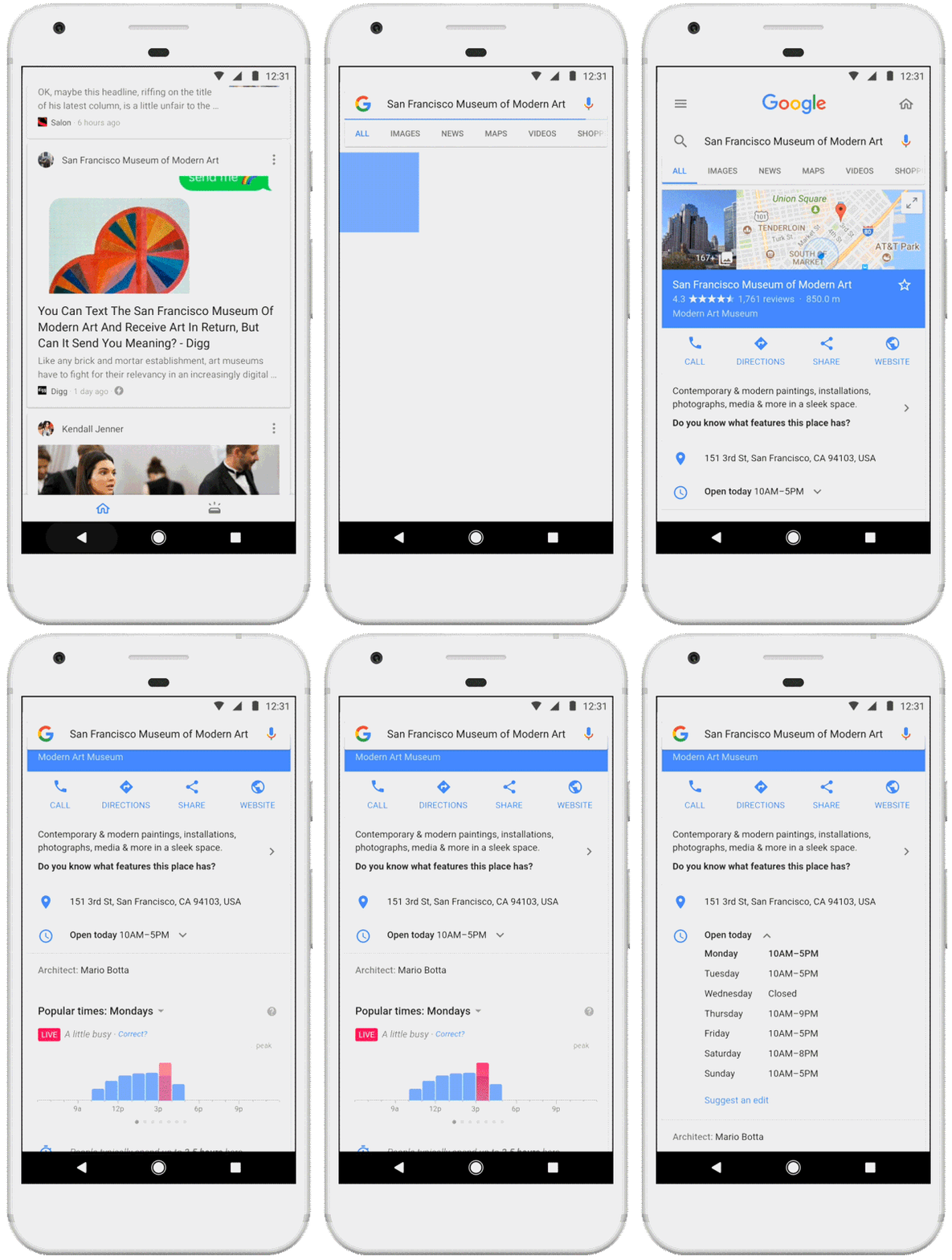
To provide information from diverse perspectives, news stories may have multiple viewpoints from a variety of sources, as well as other related information and articles. And when available, you’ll be able to fact check and see other relevant information to help get a more holistic understanding about the topics in your feed.

We’re also making it easier to dive deeper into any of the topics you see in your feed. At the top of every card, you’ll see a header that puts your interests front and center, letting you search that topic on Google with one tap.

Get more of the stuff you care about

With these updates to the feed, it’s easier than ever to stay in the know about exactly the things you care about and see more content to inform, inspire and entertain you. You’ll spend less time and energy trying to keep up with your interests and more time enjoying and cultivating them. Whether you’re a pet-loving, Nietzsche-reading, sports fanatic; a hip-hop head and burgeoning brewmaster; or anything in between, your feed should fit your fancy.

The new feed experience is available in the Google app for Android(including the Pixel Launcher) and iOS, launching today in the U.S. and rolling out internationally in the next couple of weeks. Just open the Google app and scroll up to get started.

We’ll leave you with some final words from Dr. Seuss: "The more that you read, the more things you will know. The more that you learn, the more places you'll go."

POSTED IN:SEARCH

Google Set To Make Major Changes to its Homepage

Google’s homepage has largely remained the same since 1996. It has been a pretty minimal webpage, with a big search bar in the center of the page. But now, it looks like Google is going to be making some radical changes to this homepage for the first time in over 20 years. The change includes adding Google’s interest and news-based feed to the home page. This has been a feature in the Google app since around 2012 when Google Now was announced and released. And now that is finally coming over to the desktop version.

Earlier this week, Google did announce that it was adding more customization to the feed, using its “advanced machine learning algorithms”. In fact, Google’s vice president of engineering, Shashi Thakur stated that “you’ll see cards with things like sports highlights, top news, engaging videos, new music, stories to read and more.” Basically stating that the feed won’t just be what is of interest to you, but also what’s trending in the user’s local area as well as around the rest of the world. Now the changes to the desktop have not been shown just yet, so it’s hard to say what Google has planned here, at least visually. But many are expecting Google to bring the Google Assistant to its homepage, although that is not yet confirmed.

Google wants to be the place where  mobile through the Android and iOS Google apps, the changes are out now in the US and will be rolling out over the next few weeks, internationally. Google hasn’t said much about the changes to desktop yet, but it wouldn’t be surprising to see it announced when it gets closer to its launch.

What's with the desperate need for having more RAM in your phones, everyone?

What's with the desperate need for having more RAM in your phones, everyone?

There's nothing too bad about having more RAM in a device. Free RAM = wasted RAM, but it still doesn't hurt all that much to have extra RAM.

But my main concern, the reason why I always complain about devices that have an exceeding amount of RAM, is because it makes lazy developers and OEMs lazier.

Adding more RAM to a device serves two main purposes:

1) The manufacturer doesn't need to spend extra money and time in optimizing their software to make it work well with less RAM;
2) It serves as a marketing gimmick. All these companies go around showing off that their devices have so much RAM which makes them so much faster etc., which fools non-techy or uneducated people into believing these false claims.

What I hate the most about this whole "RAM Drama" is the first point I mentioned. All of these devices that come with 4-6GB of RAM can be made to work perfectly fine in nearly all ways even with lesser RAM, and people won't even notice the difference. It's just that companies don't want to do this and they don't want to optimize their fucking software.

You may argue that tech keeps evolving and back in the day we considered 3GB of RAM a lot on smartphones, but now it's a standard. This definitely holds true, but we have not yet reached a point where we even require more than 3-4GB of RAM on any phone, let alone make it a standard.

There's also the case of VR and Android Daydream, which is said to require more RAM. But at which point is VR going to become a standard/necessity? When is the time going to come where everybody needs to use it on a daily basis? How many of these 6GB RAM devices are even going to be VR/Daydream compatible to such an extent that the VR apps will be so advanced that they will actually need an extra whole fucking gigabyte or two of RAM to function smoothly? This may happen eventually, but not in 2016. We're just not in the "VR era" yet.

We have come to a point in 2016 where the rate at which hardware is advancing is surpassing the rate at which software is advancing. What I mean is that the ratio of hardware specifications to software features should always be kept at around 1:1, but today companies are adding in so much crazy hardware with shit software that doesn't take any real advantage of this incredible hardware and doesn't function efficiently. This has caused the hardware to software ratio I mentioned above to increase to 3:2 or even 2:1, which is not good and more so not even needed.

Feel free to argue/counter any points I made above, I'm in the mood for a debate.

And TL;DR: if the Nexus released this year comes with 6GB of RAM I'd be hating on it, but if the Nexus 2 years later comes with 6GB of RAM I probably wouldn't even consider it.

JioPhone by Reliance a 4G VoLTE Feature Phone: Price, Specifications, tariff And Availability

Reliance Jio 4G VoLTE feature phone was announced by the Chairman of the company Mukesh Ambani at the company’s Annual General Meeting (AGM) on 21 July 2017. The Reliance Industries Limited chairman called the new JioPhone ‘India ka smartphone’. The JioPhone is loaded with features like expandable SD card slot, 4-way navigation, 4G VoLTE support and more.
Reliance JioPhone with 4G VoLTE Specs And Features
The Reliance JioPhone with 4G VoLTE is a feature phone that comes loaded with a few features that are seen on a smartphone. It has a bar design, with a 2.4-inch QVGA display that's not touch sensitive. The phone also has an Alphanumeric keypad and a dedicated button for Torchlight. The device also comes with a 3.5mm audio-jack for plugging in your headphones. There is also a microphone a speaker and support for FM Radio. The device also comes preloaded with 22 Indic languages that it can recognise and the voice command feature on it can also be used in all those languages. You will be able to browse the internet also on the JioPhone at 4G speeds and on Jio network. The device also comes preloaded with Jio Apps on it. Made mandatory by the government, the JioPhone also comes with an SOS button. The company has also promised that the device will also come with NFC capabilities for digital payments as well as for casting content on a different screen.

Reliance JioPhone Availability
The beta phase of testing for the Reliance JioPhone will start on August 15. The device will be available for pre-booking starting from 24 August 2017 on Jio.com. The device will be made available to the consumers that have pre-booked starting from the first week of September 2017. 

JioPhone Price and Data Plans
The Reliance JioPhone is available at an effective cost of Rs 0, but users will have to pay Rs 1500 security deposit for three years. This is still cheaper than any good feature phone out there in the market as the cost of ownership is at just Rs 500/year. Jio recharge plans and sachet packs start at Rs 153 per month. It gives users unlimited data on this 4G VoLTE feature phone. The unlimited data has 0.5GB or 500 MB FUP per day. This is a total of 14GB data for a recharge period. You can also broadcast your JioTV app on your television and it really does not need to be smart. For that user will have to pay an additional recharge value of Rs 309, which is still cheaper than a DTH connection in India. The monthly plan will let users watch three to four hours of video on their television sets. Reliance Jio has two sachet packs of Rs 24 for two days and Rs 54 per week that offer same benefits.

Sunday, 23 July 2017

The Future of Your PC's Hardware

Memristor: A Groundbreaking New Circuit
Since the dawn of electronics, we've had only three types of circuit components--resistors, inductors, and capacitors. But in 1971, UC Berkeley researcher Leon Chua theorized the possibility of a fourth type of component, one that would be able to measure the flow of electric current: the memristor. Now, just 37 years later, Hewlett-Packard has built one.
What is it? As its name implies, the memristor can "remember" how much current has passed through it. And by alternating the amount of current that passes through it, a memristor can also become a one-element circuit component with unique properties. Most notably, it can save its electronic state even when the current is turned off, making it a great candidate to replace today's flash memory.
Memristors will theoretically be cheaper and far faster than flash memory, and allow far greater memory densities. They could also replace RAM chips as we know them, so that, after you turn off your computer, it will remember exactly what it was doing when you turn it back on, and return to work instantly. This lowering of cost and consolidating of components may lead to affordable, solid-state computers that fit in your pocket and run many times faster than today's PCs.
Someday the memristor could spawn a whole new type of computer, thanks to its ability to remember a range of electrical states rather than the simplistic "on" and "off" states that today's digital processors recognize. By working with a dynamic range of data states in an analog mode, memristor-based computers could be capable of far more complex tasks than just shuttling ones and zeroes around.
When is it coming? Researchers say that no real barrier prevents implementing the memristor in circuitry immediately. But it's up to the business side to push products through to commercial reality. Memristors made to replace flash memory (at a lower cost and lower power consumption) will likely appear first; HP's goal is to offer them by 2012. Beyond that, memristors will likely replace both DRAM and hard disks in the 2014-to-2016 time frame. As for memristor-based analog computers, that step may take 20-plus years.


32-Core CPUs From Intel and AMD
If your CPU has only a single core, it's officially a dinosaur. In fact, quad-core computing is now commonplace; you can even get laptop computers with four cores today. But we're really just at the beginning of the core wars: Leadership in the CPU market will soon be decided by who has the most cores, not who has the fastest clock speed.
What is it? With the gigahertz race largely abandoned, both AMD and Intel are trying to pack more cores onto a die in order to continue to improve processing power and aid with multitasking operations. Miniaturizing chips further will be key to fitting these cores and other components into a limited space. Intel will roll out 32-nanometer processors (down from today's 45nm chips) in 2009.
When is it coming? Intel has been very good about sticking to its road map. A six-core CPU based on the Itanium design should be out imminently, when Intel then shifts focus to a brand-new architecture called Nehalem, to be marketed as Core i7. Core i7 will feature up to eight cores, with eight-core systems available in 2009 or 2010. (And an eight-core AMD project called Montreal is reportedly on tap for 2009.)
After that, the timeline gets fuzzy. Intel reportedly canceled a 32-core project called Keifer, slated for 2010, possibly because of its complexity (the company won't confirm this, though). That many cores requires a new way of dealing with memory; apparently you can't have 32 brains pulling out of one central pool of RAM. But we still expect cores to proliferate when the kinks are ironed out: 16 cores by 2011 or 2012 is plausible (when transistors are predicted to drop again in size to 22nm), with 32 cores by 2013 or 2014 easily within reach. Intel says "hundreds" of cores may come even farther down the line.

Thursday, 20 July 2017

Technology in Cricket-Integral part of cricket now!

 Cricket is a bat-and-ball game played between two teams of eleven players each on a cricket field, at the center of which is a rectangular 22-yard-long pitch with a target called the wicket (a set of three wooden stumps topped by two bails) at each end.

Development in any field is closely associated with the growth of technology. Cricket is no exception. Technological advancement is an indispensable part of the game now. Analytics and numbers determine the value of a player and every move is closely monitored to determine his strengths and weaknesses. A small fault can be easily exploited with the assistance of sophisticated software. Please read below details to get a brief knowledge about technology which is used in cricket.

Snicko meter – Invented by Allan Plaskett, the snicko meters used to detect edges from the bat using a microphone placed near the stumps.Commonly known as Snicko, the technology uses the difference between sound frequencies of the ball hitting different surfaces. For example, a woody sound has a different frequency than that of the ball hitting the glove.

Hawk Eye – One of the most used technologies to judge the trajectory of the ball, it has been used by broadcasters for a long time to help commentators and viewers know if correct decisions were given for Leg Before Wicket (LBW) appeals. This technology predicts the path of the ball after impact, using a slew of cameras placed around the cricket ground. It is also being used as a part of the Umpire Decision Review System (UDRS) in the2011 ICC Cricket World Cup.

Hot Spot – Another ball tracking technology used in television relies on infrared cameras that detect the heat signature of ball impact. For instance, wherever the ball hits the batsman, the heat signature of that particular spot changes – creating a Hot Spot. It is especially helpful in judging faint edges and close bat-pad LBW shouts. It is widely appreciated by players for its accuracy but is not a regular part of the ICC's UDRS due it's expensive implementation and sensitive equipment.

Stump Camera - The stump camera for long has been part of cricket broadcasting. It is a small camera hidden inside the stumps at both ends providing a unique angle to viewers.

Super slow motion - This technology involves the use of a high-speed camera which captures live footage and then reproduces it in super slow motion format.

Speed Gun - It is a small Doppler radar unit used to detect the speed of moving objects; it is commonly used to determine bowling speeds in cricket broadcast.

Graphics package – It may look simple, but a lot of technology goes behind making a correct scoreboard appear on TV during a match. High-quality scoreboards with bowling and batting statistics have been the backbone of cricket broadcast.

Heart Beat Monitor - or the Gator monitor tracks the heart rate of cricketers and displays it in the broadcast. For instance, the viewers can see the variations in the bowler's heart rate when he is running.

Dart fish - Similar to the Hawk-eye technology, Dart Fish tracks the trajectory and gives the viewer a clear picture of the path of the ball once it has left the bowler's arm.

Verdict: - Here are discussions about a few of the technological innovations that are in cricket or are being discussed. Cricket Technology is moving at a staggering pace and as we battle to keep up with the advances in everyday technology with the latest phones, computers and TV’s

 
Copyright © 2014 HK TECH - How to 's ; Tips , Tricks And News. Designed by OddThemes