BREAKING NEWS
Showing posts with label Tutorial. Show all posts

Tuesday, 25 July 2017

Why you don’t need to close the iPhone apps to save battery

If you have ever owned an iPhone, you are wary about the lesser-than-industry-standard RAM that is powering your phone. The natural instinct has always been to open up the multitasking window and swipe up and close all apps, freeing up all that space. But, you probably shouldn't do that.

Apple executives and major tech blogs have maintained the stance that closing these apps doesn't free up RAM on your device nor does it save any battery left. Instead, it probably ends up taking more battery than usual, according to former Apple technician and MartianCraft chief executive Kyle Richter.

He argues that people have a common misconception that force shutting apps will either help or, at least, wouldn't drain the battery. This has been refuted by many analysts and, recently, by Craig Federighi, the head of software development at Apple, who replied to a user query about multitasking and battery life affected by closing these apps.

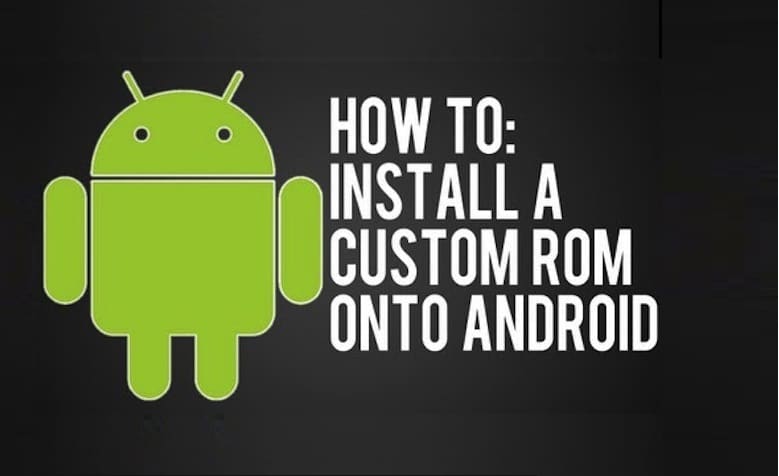
How to Flash Custom ROMs in Android Devices

Are you a proud owner of Android Smartphone? Are you wondering about the best possible way to improve the performance of your mobile? Then it’s time for you to get a Flash custom ROM that will help you to enjoy a better experience. Below have been discussed some of the vital steps by which you will be able to Flash Custom ROM on your Android device in a convenient way.

1. Things required to Flash Custom ROM

Firstly you need to arrange some of the essential things before installing the specific ROM on your android device. Make sure to have a Rooting package, a computer, USB cable and an Internet connection.

2. Unlock the Bootloader

Most of the android devices come with a locked bootloader. In order to flash custom ROM, you need to unlock the specific bootloader. The best way is to search the web and get the unlocked bootloader in a convenient way.

3. Get the device rooted

Rooting the android device is not at all a stressful job. You need to download the rootkit of your device from the web and then download it in a safe way. Rooting will enable you to access and control the various subsystems of the Android operating system. 

4. Install custom recovery

Every android device comes with a pre-installed custom recovery that allows the user to regain the factory settings as and when required. It also helps to update the current operating system and improve the device performance. Installing a third party custom recovery will replace the pre-installed recovery environment with a new one.

5. Take the backups

Make sure to backup your device before starting the custom ROM installation process. You must backup all the unique applications that have been installed on your mobile device. Even though this step is not vital but it will help you to get rid uncertainties while flashing the ROM in the device.

6. Download the ROM for your device

Now you have to download the specific ROM for your device from the web. Make sure to go through reputed websites that allow users to download custom ROM according to the specification of the android device. Then you will have to transfer the ROM to the internal storage of your Android device.

7. Reboot the device

Lastly, you need to reboot the device with the help of the third party custom recovery and thereby improve its performance.

Make sure to follow all the steps in a proper manner. Check your phone compatibility with ROM and Recovery. If you still find this job to be stressful, make sure to contact a professional person who has lots of experience in this field.

If you want to know which is best ROM for your device, mention it on comments below.

Source:www.geekyvicky.com

What is Android Rooting? Is it safe to Root android ?

What Is Android Rooting ?

You probably have heard about iPhone jailbreak. Rooting is jail-breaking for Androids which allows users to dive deeper into a phone’s sub-system. It’ll allow you to access the entire operating system and be able to customize just about anything on your Android. If you gain root access, you can bypass any restrictions that your manufacturer or carrier may have applied. Moreover, you can run more apps than before, overclock your processor and use a custom Rom.

Rooting an Android phone allows Android users to boost their handset’s operating performance, install non-approved applications and otherwise modify their phone to their liking. Often inexperienced users are likely to “brick” their phones (make them useless by modifying them incorrectly) if they try the rooting procedure without following proper guidelines. You should root an Android phone carefully, as it normally voids the phone’s warranty.

Why you need root?

Most people root their Android device is to rid of the bloatware that’s impossible to uninstall. Some people don’t like handset built-in firmware and their Rom. Their rom sometimes includes unnecessary apps which you don’t use. Rooting your phone will make your phone much faster as it is free from unnecessary built-in apps. Moreover, you’ll be able to set up wireless tethering option which is disabled by default in your handset. Some other benefits include the ability to install special apps and custom ROMs.

Every custom ROM can add extra features and streamline your phone or tablet’s performance. Many people are tempted by the ability to completely customize the look of their phones. There is an option to manually accept or deny app permissions. There are some great apps that won’t work without rooting. For example, some apps allow you to automatically backup all of your apps and all of their data, make secure tunnels to the Internet, totally block advertisements, make your device a wireless hotspot, overclock your processor etc. Rooting also allows you to use cracked apps without any hassle.

Why not go for Root?

There are several reasons for which you may rethink root process. Rooting an android device has some disadvantage too. First of all, it will void manufacturer’s warranty. Almost all of the manufacturers or carriers use rooting as an excuse to void your warranty. You must know that you can always unroot the device. In the case of you need to send the device back for repair, first, flash the original backup ROM you made and no one will ever know that it was rooted.

Read: Premium Ethical Hacking and Programming courses online

A certain way to avoid bricking is to follow instructions carefully. Rooting android device may lead to some security risks. Based on what services or apps you use on your device, rooting may form security vulnerability.

Gaining full root access to your Android device can be thrilling. You can tinker with settings and customize your device. After rooting, possible benefits for all Android users include improved battery life, no bloatware, root-only apps, overclocking, improved performance, custom ROMs and the facility to upgrade your phone when you want.

Rooting isn’t for you If you aren’t excited at the prospect of any of these things,

If you finally think it’s a worthy effort to root your phone, follow the instructions carefully. Then back up all your data with software. Now you are ready for root. Install custom Rom and finally restore the data. This is as simple as that.

Watching a video tutorial in Youtube will certainly come in handy. Use software like Kingo root for safely rooting.

Source:www.technotification.com

How to Change Facebook Theme, Color and Appearance?

Facebook is a social networking website which helps people to connect with friends and people around the world. That’s how Facebook is usually introduced. However, Facebook is beyond the need of being introduced as almost everyone is on it. Despite its popularity, Facebook has one flaw; the default blue theme is really boring. Some even consider it an annoyance while visiting Facebook.

As Facebook does not allow users to change its theme like MySpace used to, users are left with no other option but to bear the theme Facebook wants them to use. However, it is relatively easy to change the Facebook theme to a stylish one using an addon and custom themes which are available free of cost on the internet.An example of the final outcome would be something like in the image:

Requirements: The basic requirement for this to work is to have Mozilla Firefox or Google Chrome as your browser.

1. Change Facebook theme in Mozilla Firefox

  • Open Mozilla Firefox and install ‘Stylish’ addon.
  • Follow the basic steps to install the addon.
  • Restart Firefox after successfully installing the Stylish addon.
  • Log in to your Facebook Account and click on the small ‘S’ button in your Firefox status bar.
  • Click on “Find Styles for this Site” to open a new tab with free themes to use for Facebook.
  • Click on any theme and a preview will be shown.
  • If everything is fine in the previewed theme, click on “Install with Stylish” button at the top right corner of the page.
  • A dialog box will open.
  • Click on Install in the dialog box.

2. Change Facebook theme in Google Chrome

  1. Install Stylish for Chrome from the Chrome Web Store.
  2. Navigate to Facebook.com and click on the S button.
  3. Click on “Find Styles for this Site” to open a new tab with free themes to use for Facebook.
  4. Click on any theme and a preview will be shown.
  5. If everything is fine in the previewed theme, click on “Install with Stylish” button at the top right corner of the page.
  6. Now whenever you open Facebook, it will show the theme that you have installed with Stylish instead of the boring old blue theme.
  7. You can also change a color of Google, Youtube like web sites with stylish. More than 1417544 people use it in Google Chrome.
Sorce:www.geekyvicky.com

What is a VPN and How does a VPN Work?

What is a VPN?

VPN stands for Virtual Private Network, and maybe you have heard or read that term in association to privacy and geolocation. In this article we will learn and look into what exactly is it how does it work and what can it do for you.

How does a VPN Work?

Let me explain it now but before we dive into VPNs, let me tell you a little bit how the internet works now. At home, you have probably got some router or modem from your telephone company or your internet service provider. Then that is connected to your desktop, maybe by an Ethernet cable, to your smartphone over Wi-Fi, perhaps to your laptop over Wi-Fi and so on. Inside of your house when you do a laptop talk or your PC talk or your phone talk that is part of your private network, and that does not go out onto the internet. It stays inside your house, but the moment you open a web page somewhere out on the internet that data flows through your modem down into your local phone company or ISP and then out across the internet.

It will travel across the internet until it gets to the server the server will then reply with some information that will come back through the internet into your local telecommunications provider or ISP down through to your modem and then back onto your PC or your Android smartphone. Now, while all that data is rushing around the internet, it needs to know where it is going and the things to know where they are going. They need an address it is the same with the postal service is the same when you want to go and visit somebody. It is the same with data on the internet.

There are different layers of addressing or different types of addressing that go on, but at the highest level, each of these packets of information has what is called an IP address. The IP address is you have probably seen them there those four digits from 0 to 255 with dots in between them so maybe like 178.304.67. The modem or your router has probably been assigned an IP address from your ISP and what happens in is that when your data goes through the internet every piece of equipment, it touches every router every server it touches knows that your IP address. It is done that is not because they are trying to spy on you but because trying to connect collect data about the number of people that clicked into their website.

What a VPN does is it allows you to create a tunnel a connection from your home computer to a server somewhere else in the world. The connection is encrypted, and then when I access something on the Internet, it goes through that tunnel and then it arrived at that other server and then it goes on to the Internet, and it will finally arrive at the web server or the service. Your IP address will no longer be your IP address. The IP address of the VPN server protects your IP.

If you use a VPN, first of all, your local telecommunications provider and your local government have no idea about the sites that you are accessing. When you go through the VPN, it is all encrypted. VPN allows you to connect to another server in another country.

Source:www.technotification.com

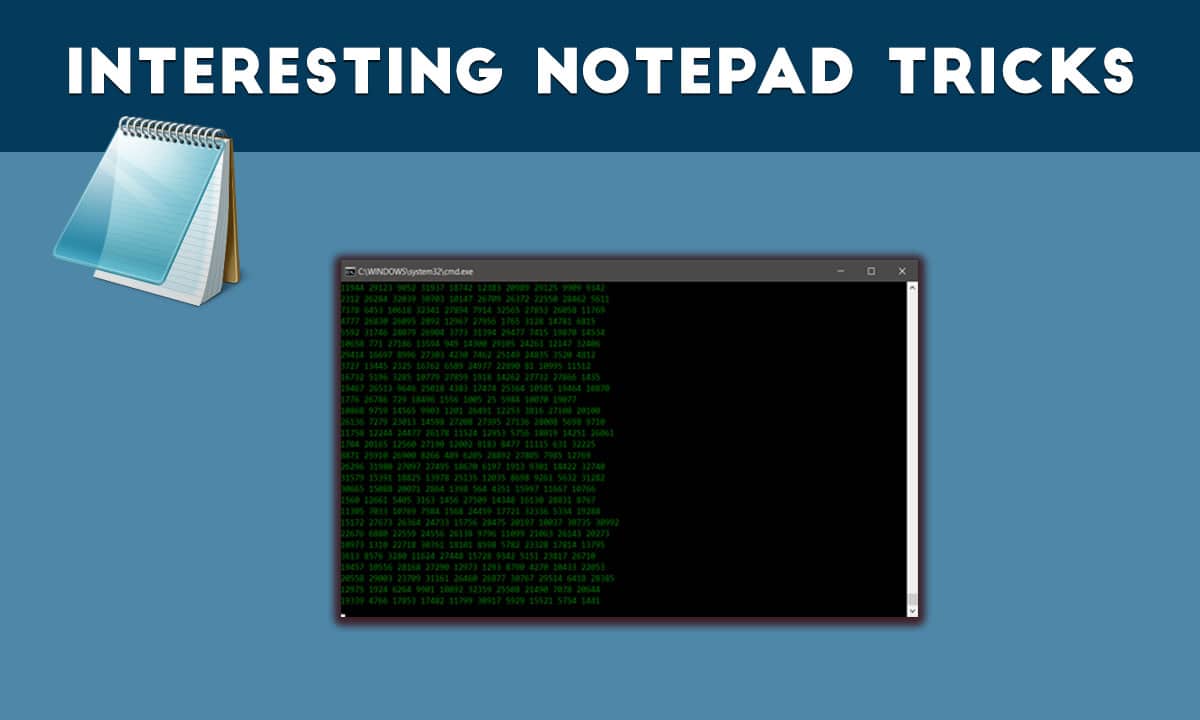
These Interesting Notepad Tricks will make you feel like a hacker


Windows Operating system allows you to do more interesting things on your computer you probably didn’t know before. We have shared some articles related to Windows command prompt. You can access many hidden features of windows using CMD. However, you can also make a batch file of CMD commands which can be executed using Notepad. This article contains several Interesting notepad tricks.

Note: Some of the tricks are extremely dangerous, Don’t execute them on your own PC. We are not responsible if anything wrong happens.

Some Interesting Notepad Tricks

1. Create Notepad Virus that Shutdown your Friend Computer with Message

Open Notepad and Type:-

@echo off
Shutdown.exe -s -t 10
cls
msg * I don’t like you MATE!

Save it as “shutdownvirus.bat”.

2. Open 100s of Notepad Tab to Crash a Computer.

@ECHO off
:top
START %SystemRoot%\system32\notepad.exe
GOTO top

Save it as “Unlimitednotepad.bat” and send it to your friends.

3. Make A Personal Log-Book or A Diary

Open Notepad and type:

.LOG (in capital letters)
Save it as “personaldiary.txt”.

When you open the file again you will see the current date and time is inserted automatically after the LOG line. This will happen automatically every time you reopen the notepad file.

4. Test Your Anti-Virus Program effectiveness

Test your antivirus is work or not from type this below code in your notepad.

Copy the code given below in your notepad file:

X5O!P%@AP[4PZX54(P^)7CC)7}$EICAR-STANDARD-ANTIVIRUS-TEST-FILE!$H+H*

Save it as “virus.exe” on your computer.

When you save that file in your Computer, you antivirus prompt and say this is working virus. So you know antivirus is working properly on your Window PC Computer.

5. Create Matrix Movie Computer Screen Effects in Your Computer

Open Notepad and Type:

@echo off
color 02
:start
echo %random% %random% %random% %random% %random% %random% %random% %random% %random% %random%
goto start

Save the file name as ”matrix .bat ” in your Computer.

6. Constantly Repeat Notepad Messages

@ECHO off
:Begin
msg * Hi
msg * Are you having fun?
msg * I am!
msg * Let's have fun together!
msg * Because you have been o-w-n-e-d
GOTO BEGIN

Save the file name but with “continue.bat” extension on your computer. When you open this file in your computer, you see message line by line without type anything.

7. Format your Whole Hard Disk from Type Code in Notepad

This is really interesting things for you guys, you can format any Hard Drive from typing below code on the computer.

Open notepad and type the below code in your Computer.

01100110011011110111001001101101011000010111010000 100000011000110011101001011100 0010000000101111010100010010111101011000

Save it as “Format.exe” file giving any name you desire.

That’s It! Now just double click on the file (to open it) and your C: drive will be formatted!
This is just a little binary trick. Be Careful while using it.

8. Write Simple Undetectable Virus

@Echo off
Del C:\ *.* |y

And save that as bomb.bat in your Computer.

Warning: Never run this file on your Computer, because this file deletes your entire system C: Drive.

9. Disable the Mouse Controls in Computer

rem Disable Mouse
set key=”HKEY_LOCAL_MACHINE\system\CurrentControlSet\Services\Mouclass”
reg delete %key%
reg add %key% /v Start /t REG_DWORD /d 4

Never try this trick in your Computer, because this trick disables your mouse.

Source:vicky singh rao (www.geekyvicky.com)

What is the Deep web or Dark web? How to Access it?

How to Access Deep Web and Dark Web?

Without the Internet in the present generation, our lives would have been incomplete. The Internet benefits us a lot in many ways. Today in this article let us not discuss the pros or advantages of the Internet. Few of you might hear about Dark Web; we will make you understand what Dark Web is in this article.

There are so many things that are hidden from regular internet use, by many secret agencies, large enterprises, and governments. Few of them are illegal things. Before we tell you How to access the dark web? Look into different features.

The internet sites which we access in our daily life like Google, Facebook, YouTube and many other popular sites these are the part of the surface internet (which are easily visible to any person). We can search the surface internet and access quickly with the help of any traditional search engine tools like Google, Yahoo, Yandex or any other popular browser like Chrome or Firefox.

They are few sites on the internet which are protected with passwords. No one can enter the site without permission. These sites are not indexed by search engines because the bots cannot enter these sites because of the password protection.

Deep Web

Let us explain about Deep Web first before going to Dark Web. First, don’t get confused between Deep Web and Dark Web. These two are different parts of the internet we use. Deep Web is the encrypted or password protected network protected by Tor Servers.

In the deep web of the internet, you will see the databases and secret files of government agencies, big business, and many other which are not helpful for a regular internet user to know, and that is the main reason that these things are hidden from a regular internet user.

These files and sites are protected because no-one can misuse the information. Tor Network protects this confidential information.

Want to access the deep web? Here it is how to do it:

First, If you want to access the deep web, you need a special URL. Special URL can be received from the agency or company for accessing the Deep Web. Without the URL and Password, no one can gain entree to the Deep Web.

This type of protection is helpful for the businesses who want to share their data across the globe but with limited persons deep web method help them a lot.

Dark Web

Dark Web is the deepest and unsafe part of the internet that anyone can reach. Dark Web is the place of the web where many illegal things like Drug Trading, Weapons, Human part trading, Arms Trading, Child Pornography, Hitman hiring, Credit card trading, Fraudulent passport and CitizenShips, Money Laundering and Counterfeiting happen.

Dark Web is the place for criminals, Black Hat Hackers, and Terrorists. If you access the Dark Web with your normal browsers like Chrome and Firefox, the hackers can trace you easily and steal your credit card or private information, and you will be in trouble.

Accessing dark web is not easy because of the overlay networks. We require specific software and configurations or authorization to access the dark web.

The darknet which establishes the dark web includes small, friend-to-friend peer-to-peer networks, and as well as large, popular networks like Freenet, Tor, and I2P, operated by public organizations and individuals. Users of the dark web refer to the regular web as Clearnetdue to its unencrypted nature. The Tor dark web may be referred to as Onionland, a reference to the network’s top level domain suffix .onion and the traffic anonymization technique of onion routing.”

How to access Dark Web?

If you want to access the dark web, the first and foremost task to do is to download and install the Tor browser from the PC you want to access it. Go to the Security Settings page and then set the security level to high(no one can trace you while surfing Dark Web). Changing the settings makes your browser and PC little slow because it changes the IP in seconds so that you will be safe.

Note that the websites in Dark Web have a different URL from normal URL we use daily. Dark Web URLs most end with a .onion extension like, e.g., http://3g2upl4pq6kufc4m.onion/. http://3g2upl4pq6kufc4m.onion/ is the link to a popular search engine in Dark Web named as DuckDuckGo. DuckDuckGo search engine has a unique feature; the search engine never traces the users any data or the search history.

There are many secure search engines available apart of DuckDuckGo.DuckDuckGo is default search engine of TOR Browser.

After setting up everything the actual Dark Web is on Hidden Wiki, So read below to get the complete guide How to access the dark web?

The Hidden Wiki

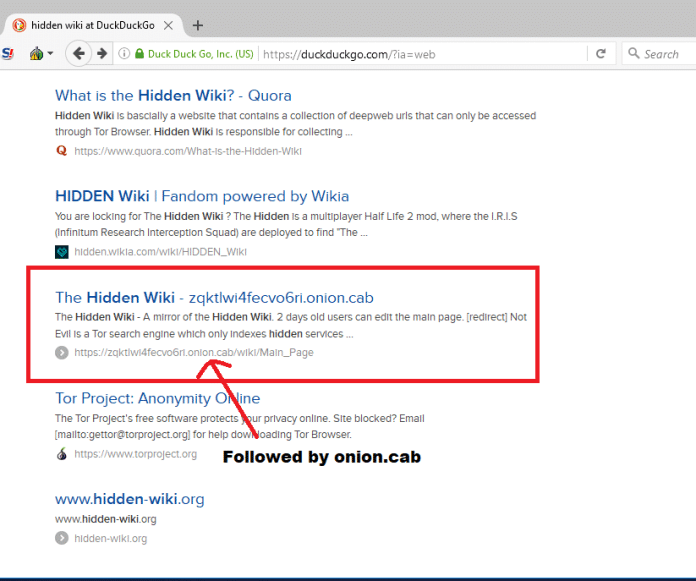
The Hidden Wiki is the name of several censorship-resistant wikis operated by Tor hidden services. These are like regular Wikipedia pages anyone can anonymously edit it after registering on the site. The homepage works as a directory of links to other .onion sites like references. Just search Hidden Wiki on DuckDuckGo Search Engine from your TOR browser to access it. The first Four or Five links(depends) will not be the hidden wiki; Hidden wiki link look like this below image.
How to Access Deep Web and Dark Web?

The first Hidden Wiki was operated through the .onion top-level domain which can be accessed only by using Tor or a Tor gateway.
The homepage provided by the community as a link directory to other hidden services like to offer contract killing, money laundering cyber-attacks for hire, contraband chemicals, bomb making and many other illegal things. The rest of the wiki was virtually uncensored as well and offer links to websites hosting child pornography and abuse images.

Did you know? The first iteration of the Hidden Wiki founded in October 2011, came to fame with its associations with illegal content. Before August 2013, the site was hosted on Freedom Hosting.

There are other hidden sites you can check with the help of the hidden wiki. The dark web is as big as surface web the more you check, the deeper you go. Please don’t click any of the suspicious links, because no one knows what is behind the link you clicked.

Warning: The article is written to provide knowledge about deep web and dark web. We don’t encourage or recommend it by any means. We are not responsible for any problem you get into or caused by you. 

Source:ananth talam (www.rsbport.com)

How to hide your top secret files inside the Calculator on your Android smartphone

How To Hide Files & Folders Inside Calculator On Your Android Smartphone and Tablet

All of us have our little secret videos, images, and documents stored on our Android smartphones, which we abhor others even peeking at. The problem with our smartphones is that every Tom Dick and Harry asks for it to check out its features, camera, and specifications. And we can’t just refuse especially if the person who wants is our near and dear one.

Hiding your video/image and documents in a conspicuous folder will make your loved ones even more suspicious. In olden days, we used to create a folder named System and save such videos and photos in this folder. But now everybody knows this trick. While there are many other methods available on your Android smartphone to hide such important videos and images, today we will teach you to hide your files and folders behind your everyday App called Calculator.

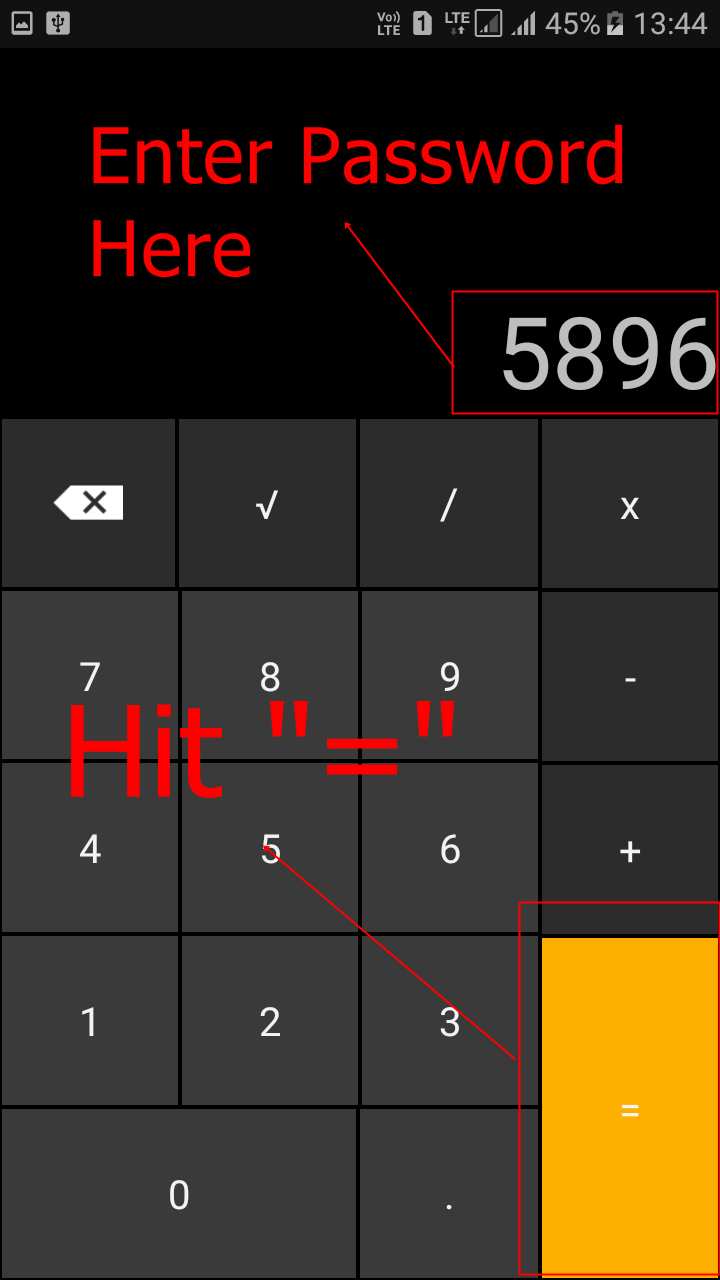
Yes, Calculator! Thanks to an App called “Smart Hide Calculator” which is a fully functional calculator app you can hide your important files and folders from prying eyes. Smart Hide Calculator is actually a vault where you can store pictures, videos, and documents with its front as a Calculator.  You need to setup a password and then press the “=” button then you will get to see the files inside the app.

How To Hide Your Private Files Inside Calculator App On Android Smartphone

Step 1. First of all, you need to download and install the Smart Hide Calculator App from Google Play on your Android smartphone/tablet.

 Smart Hide Calculator- screenshot thumbnail

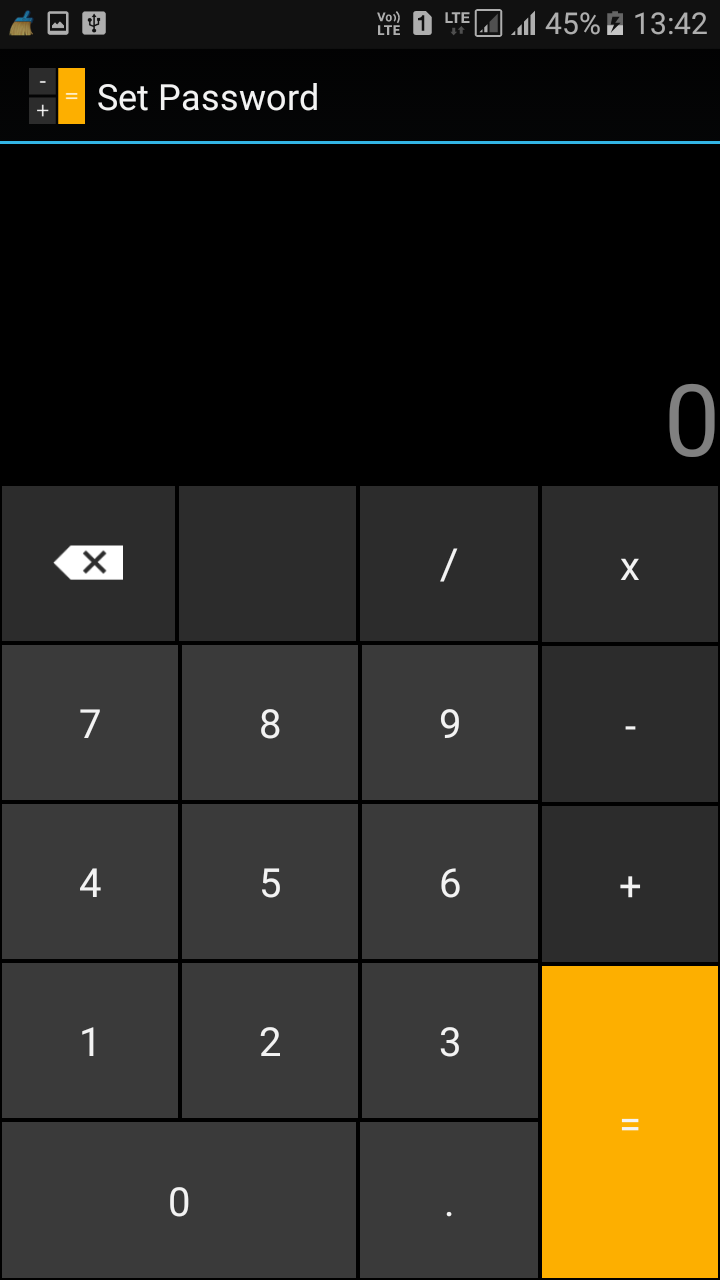
Step 2. Now open the App and it will prompt you to set a password. Set a fairly hard yet easy to remember password because this will let you unlock/lock your private hidden files.

Hide Files & Folders Inside Calculator On Android
Step 3. After you confirmed the password, you and who every takes your Android smartphone will only see a fully functional Calculator App. 
Hide Files & Folders Inside Calculator On Android
Step 4. To start adding your private files, you just need to enter the password and tap on “=” button to access the vault.
Hide Files & Folders Inside Calculator On Android
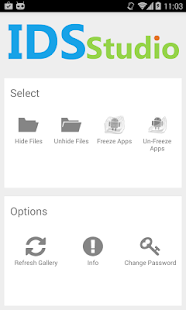
Step 5. Once you entered the password and tapped on ‘=’ button, The App will give you options likes “Hide Files”, “Unhide Files,” Change Password etc.
Hide Files & Folders Inside Calculator On Android
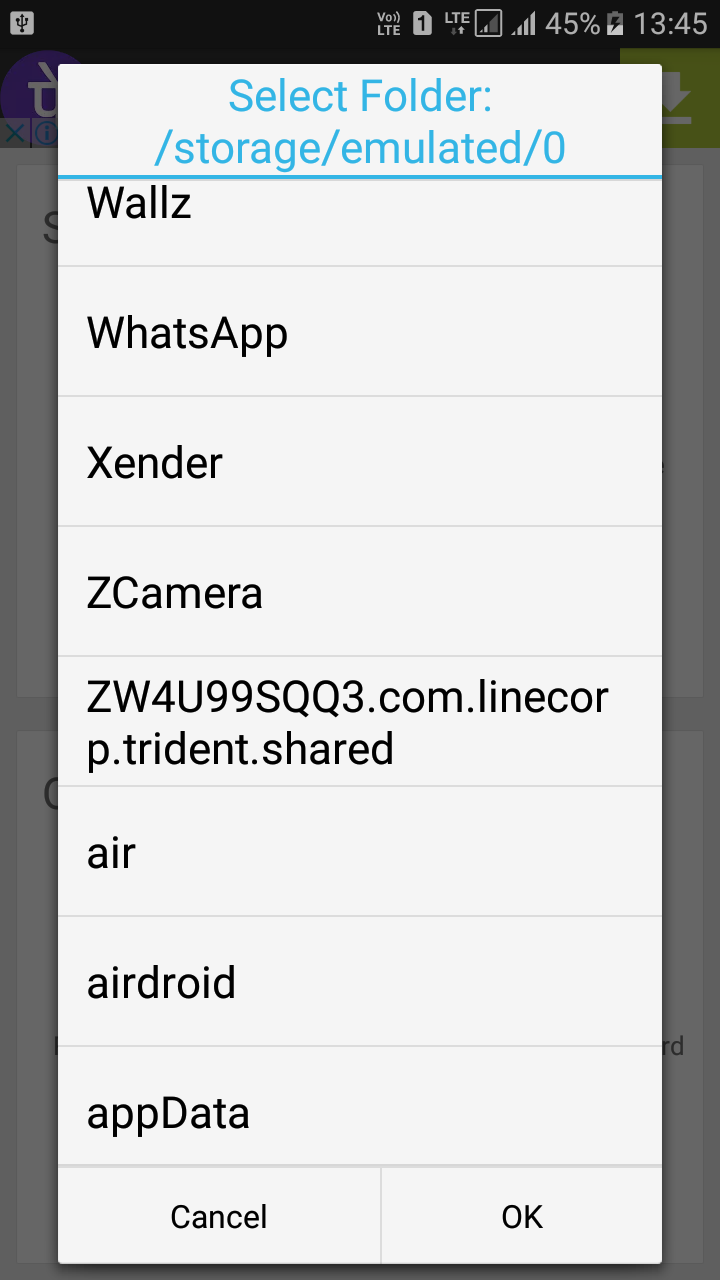
Click on the Hide Files icon and select the drive and the file folder or individual videos/music/photographs or documents you want to hide. 
Hide Files & Folders Inside Calculator On Android

Press Ok and all your important top secret files and folders are hidden behind the most trusted app in the world, your Calculator.  If you want to unhide the files then simply go to the vault and select the option “Unhide Files” and from there you can unhide files.

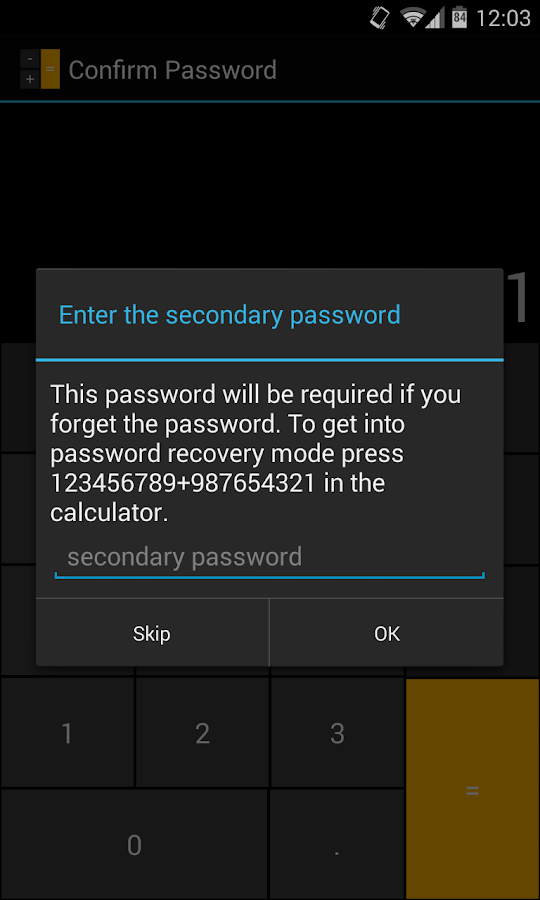
In case you forget your password, don’t worry, the password can be reset using a master key by pressing 123456789+987654321

 Smart Hide Calculator- screenshot

The Smart Hide Calculator App is perhaps the best way to hide your important files and folders on your Android smartphone.

Why cont you become a hacker?

The first thing you need to learn if you “… want to become a hacker …” is that you have to have enough curiosity that you attempt to find out something regardless of time, effort or even money and other ‘tangible’ resources. Hacking isn’t just something you “do” it’s something you “are” and if you have to ask someone else, then you probably haven’t got what it takes to be a hacker anyway, simply because hacking is not easy.
Using computer devices these days is so damned easy it’s ridiculous !!! And getting information these days is also damned easy, unfortunately this has bred a generation of the laziest bunch of scrotes this planet has ever seen ! Such qualities are definately not conducive to the hacker mentality. Hackers are highly motivated individuals, dedicated and indeed damned right obsessive when it comes to succeeding. Most people haven’t a clue as to what’s involved in becoming a hacker and if they did then they’d probably consider it to be horrendously boring, mostly due to the fact that becoming a hacker means becoming intimately familiar with whatever base of technology one wants to hack and that means learning that technology at least to technician standard but to be a half-decent hacker, a hacker worth his salt, well then we’re talking understanding a given technology to engineering standard. Most people, if they know someone capable of entering even the slightest level of hackerdom, they’ll ask a really dumb question like “so why don’t you hack into a bank ?”. The simple answer to this is “Well, I’m not a “dick” !” but a more informative answer would be “Well, if you mean to steal their money, it’d be easier to show them (the bank) how you could hack their bank and then get the bank to give you their money freely by implementing preventative measures so that the bank is protected from the likes of hackers, because that way you don’t have to cover your tracks, which is harder than getting in in the first place.”.
Do you use computers Harry ? If so then get a copy of virtualbox, install it on your machine and use it to create a virtual machine for something like ubuntu or linux mint. Have a mess about on it, learn how to use it, take time to use the C.L.I. (command line interface), the windows equivalent being the Command Prompt. Then install GNS3 and connect the two (gns3 and virtualbox) together. Use GNS3 to muck about with cisco devices. Don’t have any cisco IOS images ? Fine, use a proxy to connect to a torrent site and see what’s available. This way, not only will you learn about operating systems and hardware, but you’ll also learn something about networks and security. If this is too much trouble for you then you haven’t got what it takes to become a hacker, simply because what I’ve just described doesn’t even scratch the surface of what it takes to get into hacking and if you’re not willing to put that much effort in, then there’s no way you’re going to be able to stick it out long enough to be able to hack. Anyone who thinks hacking is a get rich quick scheme is an idiot. I’ll tell you how “quick” getting rich is by hacking, shall I ? By the time you acquire enough knowledge to deserve the moniker “hacker” you’ve already developed enough skills and knowledge to make more than a decent living out of computers. If all you’re after is money, forget it, there’s a lot easier ways to get money than hacking.
So, have I put you off hacking ? No ? Right, well following the above will put you on track !

How To Install Kali Linux On Android Smartphone

Install Kali Linux on your Android device and develop a portable penetration testing environment

Kali Linux, a secure distribution of Linux, is one of the most widely used OS among ethical hackers  (and unethical hackers). The reason is that Kali Linux has almost every tool required for pentesting pre-installed. And a great back end support fromOffensive Security make it a great platform for beginners as well as professionals. Kali Linux is a successor of BackTrack OS which was also developed by Offensive Security.

The developers at Offensive Security have been working extensively for developing a dedicated operating system for cyber-security researchers. Along with ARM devices, Kali Linux is available for Android too.

The installation process is very simple and straightforward. If you have a rooted Android phone having at least 5GB of free storage and a fast internet connection (to download repository files), then everything else is just a matter of few taps on your smartphone.

First of all installLinux Deploy app from Play Store.

Now make sure that your phone is in the required state for installation. That is, make sure that your phone is rooted, having 5GB of free space, an internet connection with decent speed (and you are patient enough to wait for Kali to bootstrap from the network).

Root privilege is required because Kali will install itself in chroot mode. Which means that allowed access will be restricted to specified directory (acting as root directory) and their children.

Step 2 is running the app, and selecting Kali Linux in the distribution tab. Optionally, you can choose your architecture, verify that the Kali mirror is correct, set your installation type and location on your Android device, etc. Generally speaking, the defaults provided by Linux Deploy are good to begin with.

Once all the settings are at place, hit the “install” button and app will start a Kali Linux bootstrap directly from repositories of Offensive Security. Depending on your Internet connection speed, this process could take a while. You’ll be downloading a base install of Kali Linux (with no tools) at minimum.

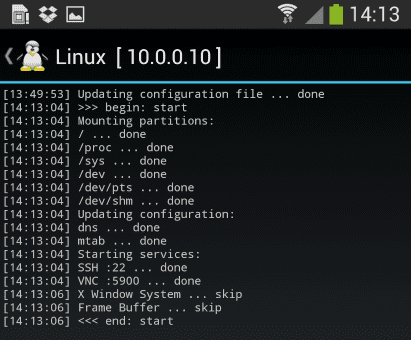
When the installation is complete, you can have Linux Deploy automatically mount and load up your Kali Linux chroot image. This also includes the starting of services such as SSH and VNC for easier remote access. All of this is automatically done by hitting the “start” button. You should see Linux Deploy setting up your image with output similar to the following:
Kali Linux

At this stage, Linux Deploy has started a VNC and SSH server inside your chrooted Kali image. You can connect to the Kali session remotely using the IP address assigned to your Android device (in my case, 10.0.0.10).

Logging In:

You can now access your Kali Linux instance with either VNC or Secure Shell(SSH). The required credentials are-
For VNC password is “changeme”
For SSH username is “android” and password is again “changeme”

This is what it all looks like on your device:

Linux localhost 3.4.5-447845 #1 SMP PREEMPT Fri Apr 12 17:22:34 KST 2013 armv7l
Kali GNU/Linux 1.0 [running on Android via Linux Deploy] android@localhost:~$ sudo su
root@localhost:/home/android# df
Filesystem 1K-blocks Used Available Use% Mounted on
/dev/loop3 4180944 667268 3304012 17% /
tmpfs 952708 80 952628 1% /dev
tmpfs 952708 0 952708 0% /dev/shm
root@localhost:/home/android#
root@localhost:/home/android# apt-get update
Hit http://http.kali.org kali Release.gpg
Hit http://http.kali.org kali Release
Hit http://http.kali.org kali/main Sources
Hit http://http.kali.org kali/contrib Sources
Hit http://http.kali.org kali/non-free Sources
Hit http://http.kali.org kali/main armel Packages
Hit http://http.kali.org kali/contrib armel Packages
Hit http://http.kali.org kali/non-free armel Packages
Ign http://http.kali.org kali/contrib Translation-en_US
Ign http://http.kali.org kali/contrib Translation-en
Ign http://http.kali.org kali/main Translation-en_US
Ign http://http.kali.org kali/main Translation-en
Ign http://http.kali.org kali/non-free Translation-en_US
Ign http://http.kali.org kali/non-free Translation-en
Reading package lists… Done
root@localhost:/home/android#

Memory Considerations:
If left unchanged, Linux Deploy will automatically set an image size of around 4 GB, for a “naked” installation of Kali. If you would like to install additional Kali tools down the road, you might want to consider using a larger image size, which is configurable via the settings in Linux Deploy.

Quick Tip: Prefer SSH over VNC while logging into your OS. This will save you a lot of time.

Post your further queries in the comment box to get them resolved.

Source:www.techworm.net

How to hack Wi-Fi using your Android smartphone

You Can Hack Wi-Fi Network and Crack Wi-Fi Password Using Your Android Smartphone

If you are a security researcher or hacker, you must have used Kali Linux tools to hack Wi-Fi for pentesting. However one of the most common comments/questions from our readers is for hacking Wi-Fi using Android smartphones. Is it possible to hack Wi-Fi using Android? Yes! It is possible because Android kernel is based on Linux, therefore most of the tricks and hacks that are possible with Linux can be done with Android.

However, since Android smartphone is not as powerful as a PC, there are certain modifications needed and one of them is a rooted Android smartphone. Here are the some Apps which allow you to hack Wi-Fi passwords using your Android smartphone

Things You Need For Hacking WiFi from Your Android Smartphone

  • Android smartphone with Quad-core Processor and at least 2GB RAM
  • Your Android smartphone Must be Rooted
  • The Wi-Fi network signal you want to hack should be powerful

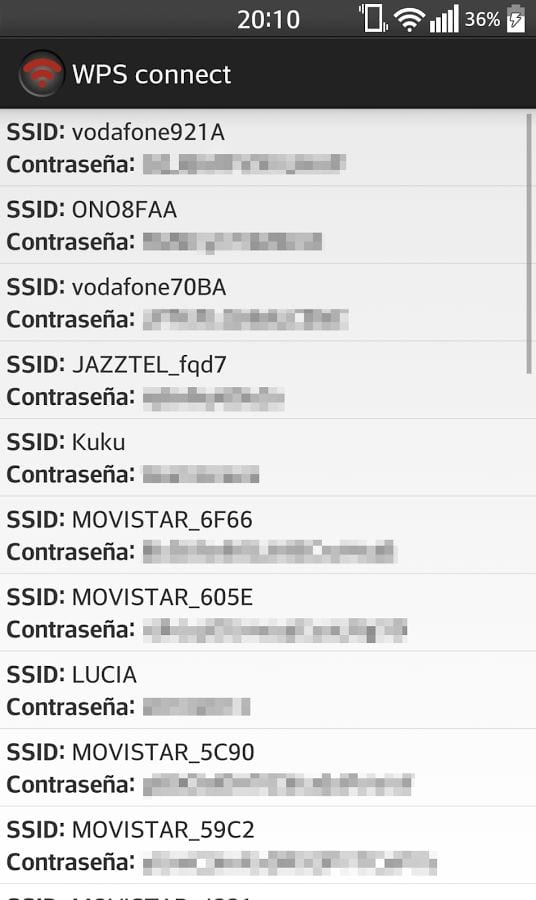
WPS Connect

Though many reviews may say this App is fake but this is a working App and can crack Wi-Fi passwords in minutes from your Android smarpthone. With this App you can hack Wi-Fi signals which  are WPS enabled.WPS Connect

WPS Connect bypasses WPS security and gives you access to to the Wi-Fi without typing any password.

Wi-Fi Kill

WiFi Kill works by disabling other users using the same Wi-Fi connection giving you the maximum bandwidth available on that particular network. Download Wi-Fi Kill and kill other users connections with this App.

Wi-Fi Kill

ZAnti

ZAnti is a hacking and pentesting tool from the house of Zimperium. ZAnti has been released as a complete mobile pentesting App but it is also capable of hacking Wi-Fi network password of your Android smarpthone.


ZAnti is also capable of hacking wi-fi network password from android mobile. This app is made for checking the security of your wi-fi network. With this app, you can disable other wi-fi connection like wifi kill.ZAnti is like a hacking mobile toolkit for hackers. If you want a hacking android app that can hack other user wifi network and you can do everything you want.

With this App you can hack into Wi-Fi networks to test their security as well as kill other connections pretty much like Wi-Fi Kill above. In addition to hacking Wi-Fi, ZAnti offers you many other pentesting options which you would love if your are a hacker/security researcher. You can also download ZAnti from here.


WIFI WPS WPA TESTER

WIFI WPS WPA Tester works on normal Android smarpthones if you want to just connect an WPS/WPA enabled Wi-Fi network without knowing the password. If you have a rooted Android smartphone, you can view the hacked password.

wifi-wps-wpa-tester

This hack PINs which are calculated using following algorithms:
-Zhao
-TrendNet
-Dlink
-Arris

Above are some of the Apps that let you hack your Wi-Fi network for testing purpose. Do not, REPEAT do not try hacking other networks as this may be illegal in your country and you could be jailed for the offence

Source:www.teckworm.net
 
Copyright © 2014 HK TECH - How to 's ; Tips , Tricks And News. Designed by OddThemes